
Fitbit Not Syncing With Your Fitness App? Here's How to Fix It

Fitbit app not syncing with your fitness app? See the most common causes, how to fix each one, and how FitBudd connects to Fitbit on iOS and Android.

Published

October 6, 2026

Last update:

October 6, 2026

10 min read
Fitbit Not Syncing
Table of Contents

Build your app in minutes.

30 days free · No credit card required

Key Takeaways

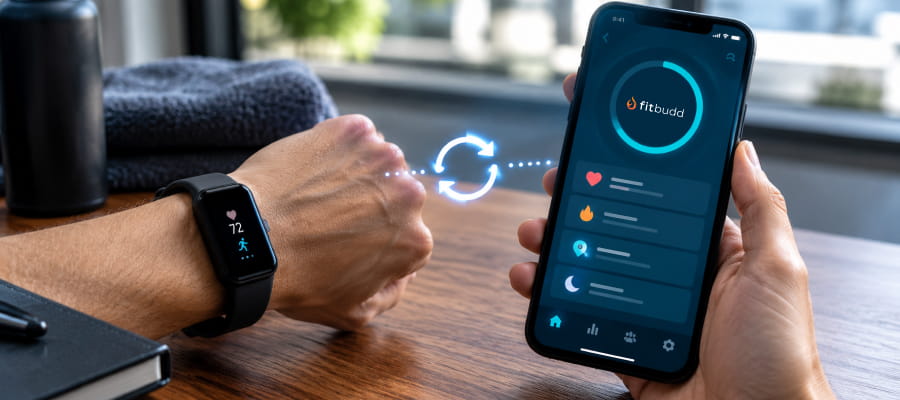
When a Fitbit app not syncing problem shows up, it's almost always one of four things: the Fitbit app itself hasn't finished syncing yet, the wrong account is connected, a permission got revoked, or the connection between the two apps needs to be refreshed. FitBudd connects to Fitbit from the client app on both iOS and Android, with a built-in troubleshooting path if the sync ever breaks.

The Real Cost of a Broken Fitbit Sync

A client's Fitbit is only useful to you as a trainer if the data actually reaches your dashboard. Fitbit still holds roughly 25% of the US wearable market, trailing only Apple, according to Statista's Fitbit research. That means a meaningful share of your clients are already wearing one, whether or not you've thought about it.

‍

Sync reliability isn't a minor annoyance either. A 2025 repeat cross-sectional survey study published in JMIR, the Journal of Medical Internet Research, found that synchronization failures and other technical breakdowns are among the most commonly cited reasons wearable users eventually stop using their device altogether. If the sync keeps failing, you're not just missing a data point. You're watching a client lose interest in a tool they could be using for real accountability.

Common Reasons Fitbit Won't Sync With Your App

Most sync failures trace back to one of four causes, and they're worth checking in this order.

Cause What's Happening Quick Check
Fitbit app hasn't synced yet Your device talks to the Fitbit app first, and the Fitbit app talks to everything else second Open the Fitbit app and confirm it shows a recent sync time
Wrong account connected FitBudd is linked to a different Fitbit account than the one your device actually uses Compare the email on both the Fitbit app and the connected account in FitBudd
Permissions were revoked A software update or manual change switched off data-sharing permissions Check the permission screen the first time you connected the apps
Stale connection The authorization between apps has quietly expired Disconnect and reconnect the integration

None of these four causes are unique to any single training app. They describe how Fitbit's own sync architecture works, since Fitbit data always passes through the Fitbit app before it reaches anywhere else.

How FitBudd Connects to Fitbit

FitBudd's Fitbit integration is set up from the client app, not the trainer dashboard, and the steps differ slightly by platform. The full walkthrough is in FitBudd's guide to connecting Fitbit.

On iOS:

  1. Open the FitBudd client app.
  2. From the home page, tap Connect Apple Health / Fitbit.
  3. Select Fitbit and sign in to the connected account.
  4. Choose Allow All on the Fitbit permission screen, then tap Allow to authorize.

On Android:

  1. Open the FitBudd client app and go to Profile > Connected Apps.
  2. Select Fitbit from the wearable options.
  3. Sign in and review the requested permissions.
  4. Complete authorization and allow a short time for data to appear.

Already connected and still stuck? You can manage or reset the connection anytime from Profile > Connected Apps inside the client app. Disconnecting and reconnecting fixes the majority of stale-connection issues on its own.

How to Fix Fitbit Sync Problems Step by Step

If you've confirmed the Fitbit app itself is syncing and the problem is specifically between Fitbit and your fitness app, work through these steps in order, as outlined in FitBudd's own troubleshooting guide.

  1. Confirm the Fitbit app has synced recently. Open it directly and check the last sync time before touching anything else.
  2. Verify both apps are using the same account. A mismatched email is one of the most common causes of a "connected but not working" sync.
  3. Review the permissions you granted. Go back through the authorization screen to make sure nothing was switched off.
  4. Close and reopen both apps. This clears a surprising number of stuck background processes.
  5. Disconnect and reconnect the integration from Profile > Connected Apps.
  6. Contact support if it's still broken, and have your phone model, operating system version, and app version ready. That detail speeds up diagnosis considerably.

Ready to stop troubleshooting and start coaching?

Fitbit sync comes standard on FitBudd, on both iOS and Android, with no extra setup fee. Start Your 30-Day Free Trial → No credit card required.

If your clients are split between Fitbit and Apple Watch, it's worth reading the companion piece on Apple Watch sync issues too, since the two integrations fail for different reasons even though the symptoms look identical.
Frequently Asked Questions
Why does my Fitbit show as connected but the data still isn't updating?
Does FitBudd support Fitbit on both iOS and Android?
How long should I wait before assuming the sync is broken?
What information should I have ready if I need to contact support?

Written by

Gaurav Saini is a dedicated fitness enthusiast and a key member of FitBudd’s product team. He focuses on UI/UX design for fitness apps and websites, creating user-friendly digital experiences for coaches, trainers, and gym owners while combining his passion for fitness with product innovation.

Gaurav Saini

UI/UX Designer at FitBudd, Fitness Enthusiast

Reviewed by

Dustin Gallagher is a fitness trainer and online coach who helps clients build strength, confidence, and lasting habits through personalised training delivered via his own coaching app built with FitBudd. Also a regular competitor in the Muscle & Fitness feature challenge, Dustin focuses on controlled, consistent training coaching clients with a mix of intensity and motivation.

Dustin Gallagher

Online fitness coach

92% trainers worldwide gave us 5 stars

Talk to your dedicated success manager and launch your branded fitness app during the demo in minutes.

Start your paid subscription for $79 FREE

No credit card required  •  Cancel Anytime
By submitting this form, you agree to be contacted by FitBudd via call, email, and SMS. Msg & data rates may apply. Reply STOP to opt out. See Terms of Use and Privacy Policy.
Thank you! Your details has been received.
Uh Oh! Something went wrong ...
FitBudd Insights

Choose A Category

FitBudd Insights

Latest Articles

Articles & insights by author.

The Best Gym Workout for Triceps: Exercises That Actually Build Mass

See the best gym workout for triceps, ranked by EMG muscle activation data, plus how to structure sets and reps for real mass gains.

Read more
July 27, 2026
How to Build a Pregnancy Safe Workout Plan?

Build a pregnancy safe workout plan with weekly structure, trimester adjustments, weight training rules, and free prenatal resources backed by ACOG.

Read more
July 24, 2026
How to Become a Certified Trainer: A Step-by-Step Guide

Learn how to become a certified trainer with this step-by-step guide. Compare certifications, meet requirements, pass the exam, and start training.

Read more
July 23, 2026
Best Athlete Management Software for Performance Tracking and Coaching

Compare the best athlete management software in 2026 for VO2 tracking, training load management, Garmin integration, and coaching business operations.

Read more
July 16, 2026