Your search for the best software for personal trainers ends here. We compared the top platforms across what matters to your business: features, pricing, what it costs at scale, add-ons, and the type of coaching model each one is actually built for.
Some are made for solo online coaches. Others only make sense if you run a gym with staff. A few try to do everything.
This guide breaks down where each platform wins and where it falls short.
Trainerize has been a go-to since 2012, but it's not always the right fit for every coaching business.
Per-client pricing that escalates fast. An interface that got busier after the ABC Fitness acquisition. A branded app that costs $250 on top of your subscription. These are the reasons trainers start looking elsewhere.
If that sounds familiar, you're in the right place. Below, we break down the platforms worth considering, what each does well, and where they fall short.
Note: FitBudd is included in this comparison with the same scrutiny as everything else.
Best for: Solo trainers and online coaches who want their own branded app with built-in video calling
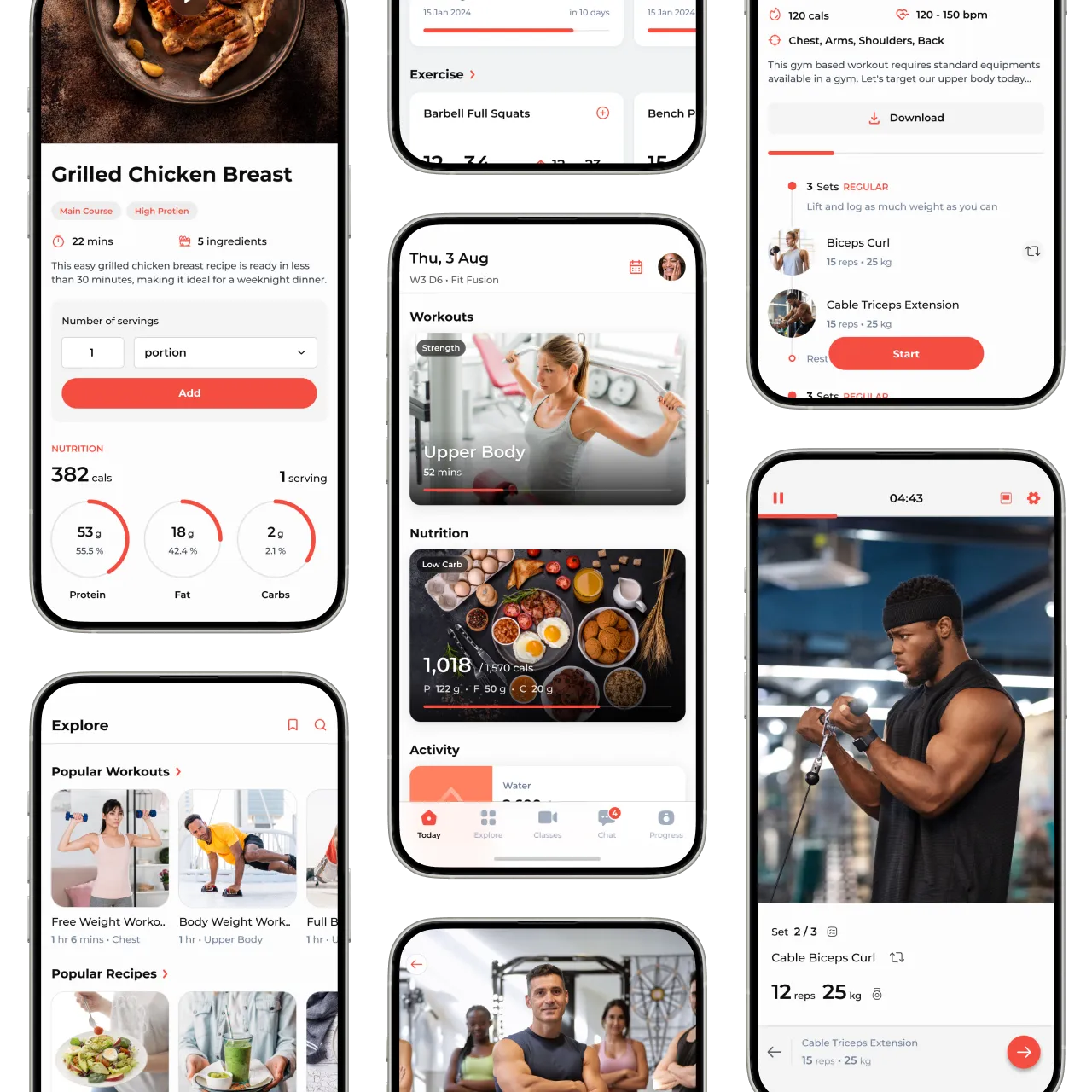
FitBudd is built specifically for independent personal trainers who want a professional, branded experience without the complexity of platforms designed for large gym chains. The platform launched in 2019 and now serves 10,000+ coaches worldwide.
● Your own branded iOS and Android app starting at $15/month for 2 clients (Super Pro at $149/mo + $75 setup)
● Built-in 1:1 video calling in all paid plans-no external tools needed
● 4,000+ exercise library with GIF demonstrations
● AI workout builder for efficient programming
● Follow-along workout feature guides clients through exercises automatically
● Built-in nutrition tracking with barcode scanning and meal plans
● Zero commission on client payments (Stripe + PayPal in 200+ countries)
● Dedicated onboarding support with real humans
● 30-day free trial
● No unlimited client plan (pricing scales at $2/client over 20)
● Fewer integrations than Trainerize
● Team features require $50/month add-on
● Less established ecosystem compared to legacy platforms
● Limited group class scheduling (requires Appointments add-on)
Add-ons: Appointments ($50/mo), Team ($50/mo), Explore On-Demand ($50/mo), Smart Flow ($20/mo)
Best for: Trainers who want simple, text-based workout delivery with minimal setup
TrueCoach keeps things straightforward. If you're coaching 1-on-1 clients and just need to send workouts and track results, it gets the job done without overwhelming you with features you won't use.
● Fastest workout builder in the category-drag, drop, done
● 1,000+ professional exercise videos (Central Athlete, USAW, KO8, Restoic, ISSA libraries)
● Clean interface that's easy for both trainers and clients
● Excellent for hybrid (in-person + online) coaching
● Simple per-client pricing structure
● Integrates with Garmin, WHOOP, and Oura for wearable data
● No branded app option at any tier
● No built-in video calling
● Nutrition features are basic (no food-based or BMR-based meal plans)
● Per-client pricing adds up quickly
● Check-in system requires workarounds
● Payments limited to US, UK, Canada, and Australia via Stripe

Best for: Coaches who build detailed, phased training programs and want all features included
PT Distinction is a favorite among trainers who geek out on programming. The platform offers serious depth when it comes to building periodized plans and customizing every detail. What sets it apart: all features are included at every tier with no hidden add-ons.
● Powerful program builder with templates and phases
● AI Program Builder creates custom programs in 20 seconds
● AI Meal Planner and AI Assistant for content creation
● Custom branded apps included on Pro ($59.90/mo) and Master ($89.90/mo) plans
● Unlimited trainers included free on all plans
● Same-day customer support standard
● 4.9-star rating across Capterra, GetApp, and G2
● No video calling at any tier
● Nutrition features described as "lacking" in some reviews
● Mobile app stability issues reported (crashes, battery drain)
● No branded website builder (website integration only)
● Smaller exercise library (~1,200 vs competitors' 3,000-4,000+)
● Learning curve for comprehensive features
Best for: Fitness studios and gyms managing multiple trainers
Everfit positions itself as a professional-looking platform that's particularly strong for multi-trainer operations. It centralizes communication, onboarding, and programming in one place.
● Clean, modern interfaceStrong automation features for client onboarding
● Group coaching and challenges built-in
● Good for studios managing multiple coaches
● 1,500+ exercise library from Ambitious Athletics, Central Athlete
● Follow-along workouts available (up to 150MB)
● Branded app costs $500 (expensive for solo trainers)
● $75 one-time fee for basic logo customization
● Per-client pricing model adds up
● Check-in system is fairly basic
● No video calling
● Nutrition tracking requires external tools (MyFitnessPal, Cronometer)
● Payment processing adds $9/mo + 1% extra fee (Stripe only, 7 countries)

Best for: CrossFit boxes, gyms, and fitness facilities
PushPress serves gyms and CrossFit boxes rather than individual personal trainers. The platform offers a free Core plan with essential features, making it accessible for new gym owners testing software options.
● Free Core plan available with essential features
● Strong for gym operations (scheduling, memberships, check-ins)
● Staff management and payroll tracking
● Community features and member engagement
● Apple Watch integration
● WOD/class programming tools
● Not designed for 1:1 online coaching
● Branded app costs $97/month + $99/year Apple Developer fee
● PushPress Train (workout delivery) costs extra ($24+/mo)
● PushPress Grow (marketing automation) costs $329/month
● No built-in nutrition tracking
● No video calling
● Per-client pricing on Train add-on
● Limited international payment support
Add-ons: Train ($24+/mo), Grow ($329/mo), Branded App ($97/mo + $99/yr)
Best for: Enterprise gyms, medical fitness, and businesses requiring HIPAA compliance
Exercise.com targets larger fitness operations with comprehensive business management tools. The platform emphasizes custom development, white-labeling, and compliance certifications that smaller platforms don't offer.
● HIPAA compliant and PCI Level 1 certified
● Fully custom-branded apps included
● Comprehensive exercise library (1,800+ exercises)
● E-commerce and digital product sales
● Livestreaming capabilities
● Advanced CRM and marketing automation
● Custom development available
● No published pricing (quote-based, estimated $199-500+/month)
● Designed for larger operations, it may be overkill for solo trainers
● The sales process is required to get started
● Higher price point than most alternatives
● Less suited for simple 1:1 coaching
Pricing: Contact sales for a custom quote (estimated $199-500+/month based on third-party sources)

Best for: Trainers who want affordable, branded apps with extensive nutrition features
Kahunas offers one of the most affordable paths to a branded app in the industry, with the Ultimate plan including a white-label app at $99/month for unlimited clients.
● Affordable branded apps ($99/month Ultimate plan)
● Unlimited clients on the Ultimate plan
● Extensive nutrition database (1.6 million foods)
● BMR-based meal planning
● 1,000+ exercise library
● Supplement tracking
● PayPal and Stripe integration
● No video calling at any tier
● English-only interface
● Workout builder frustrations reported by users
● No follow-along workouts or alternative exercises in app
● Apple Developer Account costs extra ($99/year)
● Smaller user base and ecosystem
● Limited wearable integrations
Picking the right platform depends on how you coach and what you value most:
1. Will your existing clients adapt to a new app?
Test the client experience yourself before migrating everyone.
2. Can you migrate your workout library and programs?
Some platforms offer migration support; others require manual rebuilding.
3. Does the platform scale with your growth plans?
Compare pricing at 20, 50, and 100 clients to understand true costs.
4. What does support look like when something breaks?
Check recent reviews for customer service quality.
5. Does it match your coaching model?
Gym software won't work for online coaches; 1:1 coaching software won't work for group class studios.
Based on our conversations with trainers who've switched platforms and verified user reviews, the most common frustrations include:
● Base plans start at $9/month (Grow, 2 clients) but scale quickly
● Custom-branded app requires a $169 one-time setup (Pro) or is included in Studio ($225/month)
● Video coaching costs $10/month extra
● Advanced nutrition coaching costs $5-45/month extra
● Stripe integrated payments cost $7-10/month extra
● More bugs and slower feature development
● Increased focus on enterprise features over solo trainer needs
● Integration with the ABC ecosystem (Glofox, ABC Ignite) may not benefit independent coaches
● Features designed for facility management clutter the experience
● Navigation can feel overcomplicated for simple 1:1 coaching
● Learning curve steeper than newer, focused alternatives
● Clients find the app confusing
● Onboarding requires more hand-holding than competitor apps
● Mobile app performance issues
That said, Trainerize still has strengths:
a massive exercise library, solid integrations (Mindbody, Zapier, ABC ecosystem), brand recognition, and proven scalability for larger operations. It's not a bad platform-it's just not always the right platform for independent personal trainers.
Recommendation:
FitBudd if video calling matters; PT Distinction for lowest cost with branded app; TrueCoach for simplest interface.
Recommendation:
Glofox for group class studios; PushPress for CrossFit boxes; Everfit for coaching-focused studios.
Recommendation:
My PT Hub or Kahunas Ultimate for true unlimited pricing; PT Distinction for best value with branded app at scale.
1. Start a free trial on 2-3 platforms that fit your needs. Most offer 14-30 day trials.
2. Test the client experience. Have a friend or family member try the client app. Their feedback matters more than yours.
3. Check migration support. Some platforms help move your data:
- FitBudd offers dedicated onboarding support
- PT Distinction includes migration assistance
- Most platforms can import client lists
4. Calculate true costs. Compare pricing at your current AND projected client count. Factor in all add-ons you'll actually need.
5. Don't rush. Take time to evaluate before committing. A platform switch affects your clients' experience too.
6. Read recent reviews. Check Capterra, G2, and GetApp for current user experiences-not just marketing claims.
Most platforms on this list offer free trials. Use them before making a decision.