
Your clients follow you on Instagram and read your emails, and then you ask them to download an app with another company's logo on it. That logo sits on their home screen every day and tells them your business runs on someone else's product.
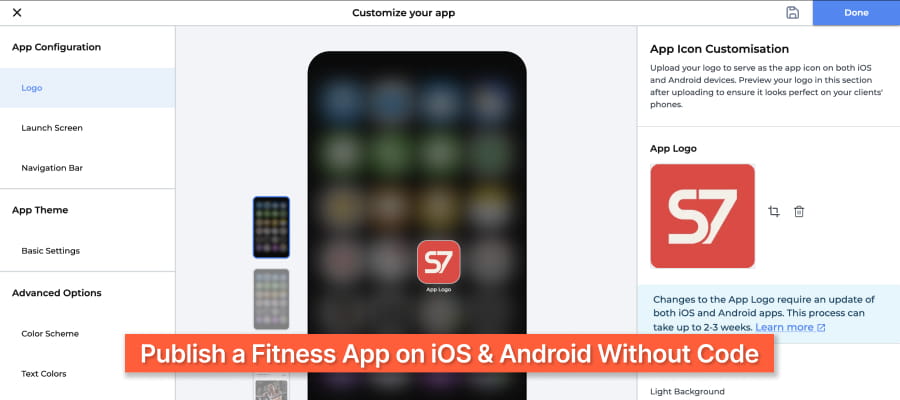
Building your own app once meant hiring developers and waiting months for a first version. Today you can publish a branded fitness app on iOS and Android by choosing your branding, loading your programs, and letting the platform handle the code and store submission.
This guide answers the five questions coaches and gym owners ask about branded apps. It covers timelines, costs, websites, gym setups, and client dashboards, using FitBudd's published pricing.
How can independent fitness coaches launch a custom-branded training app without coding?
Independent coaches launch a custom-branded training app without coding by subscribing to a white-label platform that supplies the app, the coach dashboard, and the publishing process. You upload your logo, colors, and programs, and the platform handles the code and app store submission.
FitBudd offers two levels of branding for independent coaches:
- Custom app theming (Pro, $79/month)
Clients see your logo and colors inside the app. The plan also includes a branded website, 1:1 video calling, the workout and food library, automations, and push notifications.
- Fully white-labeled app (Super Pro, $149/month)
Your white-labeled app gets its own listing in the App Store and Google Play under your brand name. The plan adds Apple Pay, Google Pay, Mailchimp integration, and direct app sign-ups.
Your part of the setup is coaching content. You build programs with the AI workout builder or the 4,000+ exercise library, then add nutrition plans and pricing while FitBudd builds the app.
Xavier G., a trainer who has used FitBudd for more than two years, explained his reason for switching from another platform to FitBudd in a Capterra review: "I wanted my own brand. Needed to represent myself."
What is the fastest way to publish iOS and Android apps for a coaching brand?
The fastest way to publish iOS and Android apps for a coaching brand is a white-label platform that submits both apps from a single setup. On FitBudd Super Pro, apps typically go live 1 to 3 weeks after setup is complete, depending on Apple and Google review.
Unfinished brand assets and incomplete store listing details slow down most launches, so prepare both before you start. Follow these steps to publish your fitness app on iOS and Android in the shortest time:
- Start your FitBudd trial and choose Super Pro. Super Pro carries a one-time $75 setup fee.
- Upload your brand assets. Prepare your app name, icon, logo, and brand colors together.
- Load your core content. Add two or three starter programs so clients have a workout to open on launch day.
- Approve the app store listing. FitBudd prepares the builds and submits them for review.
- Invite your clients. Share your App Store and Google Play links through email, Instagram, and your website.
Coaches who finish their brand assets and starter programs in the first week give themselves the best chance of a fast launch. For a full breakdown of costs and timelines, read How to Launch Your Own Online Fitness App.
What solutions enable quick launch of a branded fitness website?
Coaching platforms with a built-in website builder enable the quickest launch of a branded fitness website, because your coaching tools, app, and payments already sit in one system. FitBudd includes a branded website on the Pro plan, created with its fitness website builder.
A standalone site builder needs separate connections to your coaching tool, payment processor, and booking system. Each connection adds maintenance work and creates another point where a client sign-up can fail.
A FitBudd website gives you:
- Your logo and brand colors across every page.
- Client checkout through Stripe or PayPal.
- Direct app sign-ups on Super Pro, so new clients move from your site into your app.
Use FitBudd automations to handle onboarding steps after a client signs up. The website then passes each new client straight into coaching.
How can gyms offer members a white-label mobile app experience?
Gyms offer members a white-label mobile app experience by publishing an app under the gym's own name that covers workouts, classes, announcements, and payments. On FitBudd, multi-trainer gyms use Studio Elite, which adds multi-location access, team logins, QR check-ins, group classes, analytics, and a Mindbody integration.
The right plan depends on how your gym operates:
FitBudd fits personal training studios, semi-private studios, and hybrid gyms that combine in-person sessions with digital programs. Gyms that run mostly high-volume group classes can keep their current class system and connect it through the Mindbody integration.
Which features keep gym members using a branded app?
Challenges, leaderboards, and progress tracking give gym members a reason to open a branded app between visits. FitBudd includes challenges and leaderboards on the Creator Elite plan, alongside video on demand and virtual communities.
Studio Elite includes announcements for class updates and schedule changes. For branding and submission steps, follow the guide to launching a white-label gym app.
How can fitness professionals build their own branded client dashboards?
Fitness professionals build branded client dashboards by using a coaching platform that shows each client their workouts, nutrition, progress, and messages in an app that carries the coach's brand. On FitBudd, every client gets a personal dashboard inside your branded app, and you manage every client from one coach dashboard.
The client dashboard includes:
- Workouts: the assigned session, with exercise demo videos.
- Nutrition: meal plans built from the food library.
- Progress: progress photos, strength metrics, body fat percentage, and exercise history.
- Check-ins: forms that clients complete inside the app.
- Communication: chat and 1:1 video calls with you.
Your coach dashboard shows compliance and progress for every client in one view. You can see who missed a check-in or stalled on progress without opening a spreadsheet.
How is a branded dashboard different from a shared spreadsheet or PDF?
A branded dashboard updates as clients log their sessions, while a spreadsheet or PDF is a static file that clients have to find and open. You see each logged workout in your dashboard once the client saves it.
A single app for programs, progress, and conversations replaces the mix of email, WhatsApp, and Google Sheets that coaches juggle. TTrack client progress with photos, measurements, and workout history.
How do custom app theming, a white-label app, and a custom-built app compare?
Custom app theming is the fastest and lowest-cost option, and a white-label app lets you add your own store listing. A custom-built app gives full control but costs the most and takes the longest to build.
Both FitBudd plans include 20 clients, with $2 per additional client per month. Compare all FitBudd plans and pricing before you choose.
Which FitBudd plan should you choose for a branded app?
Choose Super Pro to publish your own fitness app on iOS and Android, and choose Pro if custom in-app theming covers your needs. Choose Studio Elite for a multi-trainer gym or several locations, and Creator Elite if your business runs on video on demand, challenges, and communities.
Start your free 30-day trial with no credit card required, or book a demo to see a branded app live.