

You have built a strong gym, a loyal client base, and a coaching reputation worth putting your name on. The next move is getting your brand into your clients' pockets. Not through a third-party app that carries someone else's logo in the App Store. Your app, your name, your brand.
A white label fitness app makes this possible without spending $100,000 on a development team or waiting 12 months for a custom build to ship.
This guide walks through exactly how to start a white label fitness app for your gym, what the process looks like, how long it takes, and why FitBudd is the fastest, most complete path from decision to launch.
A white-label fitness app lets gym owners, trainers, and fitness coaches launch a fully branded iOS and Android app under their own fitness app name, without having to build it from scratch. FitBudd's Super Pro plan delivers a live, fully branded app in the App Store and Google Play within 4 weeks, at $149 per month, with zero commission on payments.
Also, Read Best Workout Apps for Beginners for New Clients
What Is a White Label Fitness App?
A white-label fitness app is a pre-built software platform that a gym, trainer, or fitness brand customizes and launches under their own identity. White label solutions enable businesses to benefit from enterprise-level features without an in-house tech team. The platform's underlying technology is built and maintained by the software company. The branding, name, and client-facing experience are entirely yours.
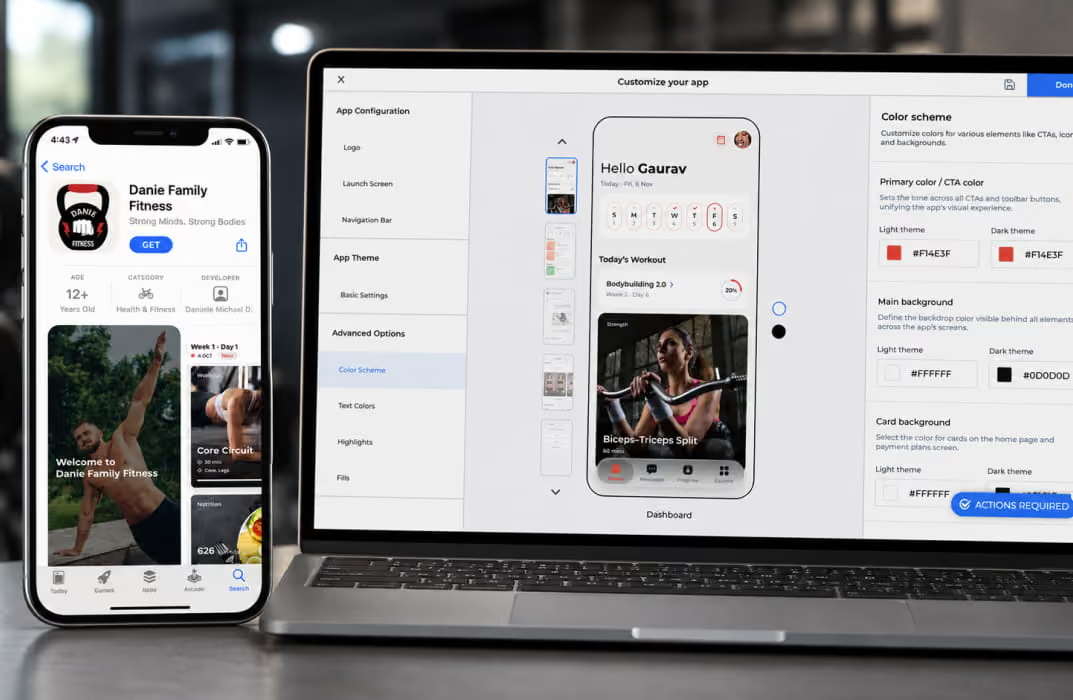
When a client downloads a white-label fitness app from the App Store, they see your gym’s name, your logo, and your brand colors. They do not see the name of the platform powering it. To your clients, it is your app. A comprehensive white label platform enables you to launch a custom branded fitness app with your own logo, color scheme, and app name, ensuring your brand stands out.
This is fundamentally different from coaching software that adds your custom logo to a shared interface. TrueCoach, for example, allows coaches to add their logo and choose from six color themes, but clients are still downloading and using TrueCoach's branded app. There is no custom branded App Store listing under your gym's name. There is no separation between your identity and TrueCoach's.
A true white label fitness solution like FitBudd puts your brand in the App Store as a standalone listing, with your name as the app publisher. That distinction matters more than most gym owners realize until they see a client refer a friend by saying, "download my coach's app" versus "download FitBudd." A key feature of white-label fitness apps is the ability to customize branding elements like logos, colors, and app names, allowing you to present a cohesive brand identity to your clients.
For a full comparison of what distinguishes genuine white-label platforms from coaching software with basic branding, see the breakdown of the top white-label fitness apps compared.
How Can I Start a White Label Fitness App for My Gym?
"How can I start a white label fitness app for my gym?" is the most direct question gym owners ask when they are ready to move beyond spreadsheets and generic coaching tools.
White label fitness apps have become essential tools for running and scaling a fitness business, offering a comprehensive solution that integrates member management, class scheduling, digital coaching, and more.
The process typically involves choosing an all-in-one platform or a single platform that allows you to manage all aspects of your fitness business from one place.
The vast majority of coaching businesses find white label solutions sufficient for their needs, thanks to their cost-effectiveness, rapid deployment, and robust feature sets.
Additionally, the best white-label fitness apps provide flexibility to adapt to different fitness models, catering to various client preferences such as strength training, yoga, or nutrition-focused programs. Here is the complete answer.
Here is the complete answer.
Step 1: Define What Your Coaching App Needs to Do
Before choosing a platform, get clear on the core functions your app needs to serve, including key features such as habit coaching and client engagement tools:
Client-facing functions: Workout delivery, progress tracking, nutrition logging, check-ins, in-app messaging, class booking, push notifications. Consistent digital engagement features in fitness apps can reduce cancellations and increase member retention.
Coach and admin functions: Program builder, client management, payment processing, analytics, CRM, lead capture.
Brand functions: Your logo, your colors, your app name in the App Store, your website linked to the app.
Most gym owners underestimate the brand functions. They think about features first and brand presence second. In practice, the brand experience is what your clients actually talk about and what drives referrals. Both matter equally.
Step 2: Choose Between Custom Development and a White Label Platform
Custom fitness app development typically costs $50,000 to $500,000, depending on complexity. A mid-range custom app with workout delivery, progress tracking, payments, and nutrition tools typically falls in the $80,000 to $150,000 range. Development takes 6 to 12 months. Ongoing maintenance adds another $10,000 to $30,000 per year.
A white label fitness app platform like FitBudd delivers the same branded outcome for $149 per month. The platform handles all development, maintenance, security updates, and App Store compliance. You get the branded result without the engineering overhead.
For most gym owners and fitness coaches, custom development is not a realistic option at this stage of growth. The $50,000 to $500,000 investment requires revenue that most coaching businesses are still building toward. White label is not a compromise. It is the smarter financial decision at this stage.
For a full cost comparison of both paths, the fitness app development guide covers what custom builds actually cost versus what white-label platforms deliver.
Step 3: Select the Right White Label Platform
Not all white label fitness platforms are the same. Evaluate each one on these criteria:
FitBudd's Super Pro plan meets every criterion. Your app launches in the App Store and Google Play under your gym's brand name. Your logo and colors are applied throughout. Payments are processed through Stripe and PayPal with zero commission. The launch takes approximately 4 weeks, with FitBudd's onboarding team handling the App Store submission process.
Step 4: Set Up Your Branding Assets
Before your app can be submitted to the App Store, you need the following:
Logo: High-resolution, transparent background. At a minimum of 1024x1024 pixels for App Store submission.
App name: The name that will appear in the App Store. This should match your gym or coaching brand name exactly as you want clients to see it.
Brand colors: Primary and secondary hex codes. These are applied throughout the app interface.
App icon: A square version of your logo adapted for the app icon format. FitBudd's team can assist with this if needed.
App Store description: A short (170 characters) and long (4,000 characters max) description of your app for the App Store listing. This is also an SEO opportunity for app store discovery.
Apple Developer Account: Required for iOS App Store listing. Apple App Store charges $99 per year. FitBudd's team walks you through account setup and handles the technical submission.
Google Play Developer Account: Required for Android. Google charges a one-time $25 registration fee.
Step 5: Build Your Program and Content Library
While your app is being submitted to the stores, use the time to build the content that will be inside it. This is where FitBudd's workout builder becomes essential.
Build your core workout programs from FitBudd's 4,000-exercise library. Upload custom exercise videos. Structure your membership tiers and pricing plans. Set up your nutrition templates. Write your welcome message and onboarding sequence for new clients.
The goal is that when your first client downloads the app, there is already enough content inside to demonstrate the value of the program they signed up for. An empty app on launch day is a missed first impression.
Step 6: Set Up Payments and Pricing
Before going live, configure how clients will pay for access to your app and programs. In FitBudd, this is done through the integrated Stripe and PayPal setup in your dashboard, enabling integrated payment processing so you can sell programs, offer premium subscriptions, and enable in app purchases directly within your white label fitness app.
Decide on your pricing model:
Subscription model: Monthly or annual access to all app content and coaching. This is the most common model for gym apps and online coaching fitness businesses.
Tiered access: Different membership levels at different price points (e.g., app-only access vs. app plus live coaching calls vs. app plus 1-to-1 programming).
One-time program purchase: Clients buy a specific program or course once and access it on demand. Works well for structured challenges or transformation programs.
FitBudd supports all of these models. Zero commission is charged on any payment processed through the platform.
For guidance on pricing your app and programs effectively, the online fitness app guide covers pricing structures and revenue models for fitness coaches at different stages.
Step 7: Submit to the App Store
FitBudd's team handles the App Store submission process on your behalf. For most coaches and gym owners, this is the part that would be most technically complex to manage independently. App Store guidelines change regularly, submission review times vary, and rejection for technical or policy reasons can set a launch back by weeks.
With FitBudd, your app is submitted by people who have done this hundreds of times. Average approval time for iOS is 1 to 3 business days once the submission is complete. Android is typically 24 to 48 hours. The full process from onboarding to live app takes approximately 4 weeks.
Step 8: Launch and Acquire Your First Clients
An app in the App Store is not the same as a full client base. The launch phase requires a deliberate effort to drive downloads and conversions.
The most effective first-step strategies for gym owners launching a white label app:
Tell your existing clients first. Send a personal message to every client you are currently working with. Ask them to download your new app and migrate their coaching there. This is your fastest path to early downloads and reviews in the App Store.
Update your Instagram bio and website. Your App Store link should be the primary link in your bio. Remove links to booking tools, spreadsheets, or generic coaching platforms.
Create an App Store-specific launch offer. A limited-time discount for clients who sign up through the app in the first two weeks creates urgency and rewards early adopters.
Collect reviews early. App Store ratings signal credibility to new visitors. Ask your first 10 clients to leave a review within the first week of using the app.
For a complete breakdown of how to convert followers and leads into paying app subscribers, see the guide on converting followers to paying clients.
White Label Fitness Solutions: What the Market Offers in 2026
"White Label Fitness Solutions" covers a wide range of platforms. Here are the main options in 2026.
FitBudd: The Purpose-Built White Label Platform for Coaches and Gym Owners
FitBudd was built from the ground up as a white label fitness platform for independent coaches, personal trainers, and gym owners. It is not a generic coaching tool with a white label branding overlay added later. The entire product is designed around the premise that your clients should experience your brand, not a platform.
At the Super Pro plan ($149 per month), FitBudd delivers:
A fully branded iOS and Android app in the App Store and Google Play Store, listed under your gym or brand name. When someone searches for your business in the App Store, your app appears.
A 4,000-exercise library with video coaching demonstrations, filterable by muscle group, equipment, and workout type. Custom exercises can be added with an uploaded YouTube, Vimeo, or direct MP4 video.
Built-in nutrition tracking, habit check-ins, progress photos, video calling, in-app messaging, class scheduling, and a website builder with lead capture forms, all inside the same platform.
Stripe and PayPal payment processing across 200 countries with zero commission on client payments.
Dedicated onboarding support from real humans who manage your App Store submission and get your app live within 4 weeks.
A real case: Amy Hollings, founder of BossFit, launched her fully white-labeled BossFit app with FitBudd. Within 13 months, she grew from 0 to 1,000 paying clients, hit her first six-figure month, and passed £100,000 in total revenue. The branded app created a consistent, professional touchpoint that fueled word-of-mouth referrals and made premium pricing feel justified.
- Pricing: Pro at $79/month. Super Pro (branded app) at $149/month. Studio Elite at custom pricing.
- Best for: Personal trainers, gym owners, boutique fitness studios, online coaches, fitness influencers
- Launch timeline: Approximately 4 weeks from onboarding to live app
Start your white label app today. Begin your 30-day free trial, no credit card required.
TrueCoach: Program Delivery Tool, Not a White Label Platform
TrueCoach is a popular personal trainer software trusted by 20,000 coaches. It is well-reviewed for program delivery, client communication, and workout tracking. But it is not a white-label platform, and this distinction matters for gym owners who want a branded app.
According to independent reviews, including Fitness Drum's assessment: "You can't white-label the software." Clients download and use the TrueCoach app. Coaches can add their logo and choose from six color themes, but there is no separate App Store listing under the gym's brand name. Clients associate the app experience with TrueCoach, not with the gym.
TrueCoach's Elite+ plan does offer a fully white-labeled mobile app at custom pricing, but this is designed for large operations of 1,000 or more clients. For a gym owner with 20 to 200 clients, the cost is prohibitive and the threshold unreachable.
Additional limitations noted in verified reviews on G2, Capterra, and GetApp: the coach mobile app lacks full programming functionality, the Android experience redirects to the web version for admin tasks, nutrition features are limited and rely on MyFitnessPal integration, and invoicing customization is restricted.
- Pricing: Starter at $26.34/month (5 clients). Standard at $57.99/month (20 clients). Pro at $136.99/month (50 clients). Elite+ at custom pricing for 1,000 clients with a white label app.
- Best for: 1-to-1 online coaches who want a clean program delivery experience
- Gap: Not a white label platform for most coaches. No branded App Store listing. Requires Elite+ pricing for true white labeling.
Trainerize (ABC Trainerize): Enterprise White Labeling at Enterprise Prices
Trainerize is the industry standard for online coaching software, used by a large number of personal trainers globally. It offers a comprehensive feature set covering workout delivery, nutrition, client communication, and marketplace access.
Trainerize offers white-label functionality, but it is not included in standard plans. A branded mobile app experience under your gym's name requires working directly with the ABC Fitness sales team, and pricing reflects an enterprise commitment. For gyms with 20 to 50 active clients, building toward most white label apps, the cost structure is typically out of reach until the business is already at significant scale.
Standard Trainerize plans use the Trainerize brand in the client-facing experience. The workout and coaching content is yours, but the app the client downloads is Trainerize's.
- Pricing: Standard plans from $10 to $250 per month based on client count. White label app at enterprise pricing.
- Best for: Established coaching businesses with high client volume looking for a recognized platform with marketplace reach
- Gap: White labeling requires enterprise pricing. Not accessible for most independent gym owners.
Can I Customize a White Label Fitness App to Include My Branding?
"Can I customize a white label fitness app to include my branding?" is the right question to ask before choosing any platform. And the answer is: it depends entirely on which platform you choose.
Here is what true customization looks like on FitBudd, and where other platforms fall short:
In the App Store: FitBudd lists your app under your gym's name. Your clients search for your brand in the App Store and find your app. TrueCoach and basic Trainerize plans do not do this. Clients find TrueCoach or Trainerize in the App Store, not your gym.
Logo throughout the app: FitBudd applies your logo to the splash screen, the home screen, and throughout the navigation. This is consistent with platforms like Trainerize at the enterprise level.
Brand colors applied to the UI: FitBudd applies your primary and secondary colors to buttons, headers, and UI elements. TrueCoach offers six preset color themes, which may not align with your brand identity.
Custom domain website: FitBudd includes a website builder that lets you run your coaching website on your own domain, with your branding, and connect it directly to your app. This is not included in TrueCoach or standard Trainerize.
In-app content is yours: All workout programs, nutrition plans, videos, and client data belong to you, not to the platform. This is consistent across all major platforms.
The distinction that matters most: does your client's phone display your gym's name in their apps, or does it display TrueCoach? That is the difference between white labeling and branding customization.
How Can I Customize a White Label Fitness App for My Gym?
"How can I customize a white label fitness app for my gym?" covers the specific steps inside the platform after you have chosen your provider. Here is exactly what the customization process looks like in FitBudd.
Step 1: Upload your branding assets
In your FitBudd dashboard, go to your Brand Settings. Upload your logo (PNG, transparent background). Enter your primary and secondary brand colors using hex codes. Set your app name as you want it to appear to clients.
Step 2: Set up your app icon
Your app icon appears on your clients' home screens and in the App Store listing. FitBudd's team reviews your icon for App Store compliance before submission and will flag any technical issues.
Step 3: Customize your client-facing welcome experience
Set the welcome screen message, introductory video coaching, and onboarding flow that clients see when they first download and open the app. This is your first impression at scale. Make it reflect your coaching philosophy, not a generic platform default.
Step 4: Configure your program and content structure
Using FitBudd's AI workout builder, build your signature programs and save them as templates. Upload your proprietary exercise videos. Set up your nutrition templates and check-in forms.
Step 5: Set your pricing and membership tiers
Configure your membership options, pricing, and payment settings inside FitBudd's billing dashboard. This connects to Stripe and PayPal and is ready for clients to purchase before your app goes live.
Step 6: Preview the app before submission
FitBudd provides a preview build of your app so you can review the full client experience before submitting to the App Store. This is where most coaches adjust their welcome messaging and check that all branded elements look exactly as intended.
Step 7: App Store submission
FitBudd submits on your behalf. You do not need to manage developer accounts, App Store Connect, or Google Play Console independently. The team handles technical requirements and policy compliance.
For coaches who want to build a complete online coaching business alongside their white label app, the online fitness coaching platform overview explains how FitBudd's tools work together beyond the app.
What Does a White Label Fitness App Cost Compared to Building Your Own App?
This is one of the most searched questions in this category and one that most articles answer vaguely. Here are the actual numbers.
The $75 one-time setup fee for FitBudd covers the setup of Apple Developer and Google Play accounts by FitBudd's team. The annual Apple Developer account cost ($99/year) is the only recurring third-party cost outside the FitBudd subscription.
At $149 per month, a gym owner with 20 clients paying $100 each generates $2,000 in monthly revenue, with a platform cost of $149 and zero commission on payments. That is a 7.5% cost ratio before factoring in client retention, referral value, or the ability to scale to 50 or 100 clients without the platform cost increasing.
FitBudd vs TrueCoach vs Trainerize: White Label Comparison

Why FitBudd Is the Right White Label Choice for Gym Owners in 2026
Most gym owners evaluating a white-label fitness app start by looking at the features. That is the right place to start, but the decision usually comes down to three things: the brand experience your clients get, the revenue you keep, and the time it takes to get live.
FitBudd delivers on all three. Your clients download an app with your gym's name in the App Store. They use a platform that looks, feels, and behaves like your business, not like a third-party software company's. The payments they make go directly to you with zero commission. And you are living in 4 weeks, not 4 months.
For gym owners who have been using TrueCoach and want to understand what a true white-label experience looks like, the FitBudd white-label fitness app overview covers every feature difference in detail.
For a broader look at how white-label solutions compare across the market, the top white-label fitness apps guide provides a side-by-side breakdown.
The FitBudd white label apps' best picks guide is also a strong reference for coaches evaluating this decision across multiple platforms.
Ready to put your gym's name in the App Store? Start your 30-day free trial, no credit card required.