



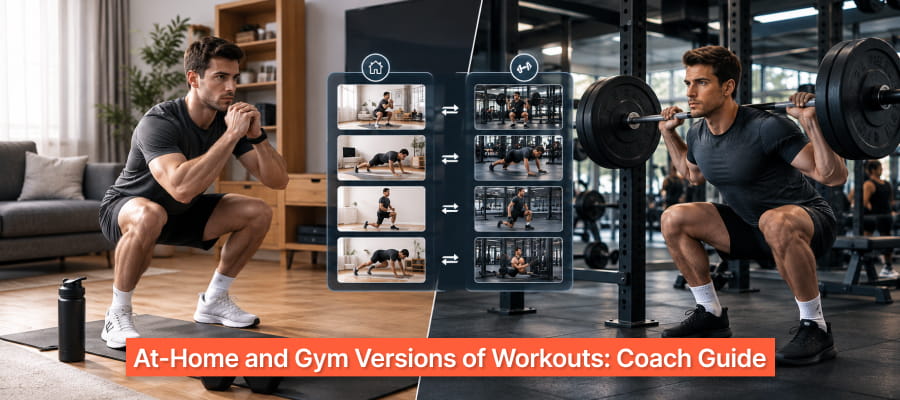

Your client messages at 6 a.m. to say the gym is packed, the kids are sick, or they are traveling this week. Your program says barbell squats and cable rows, so they either skip the session or improvise something unrelated to your plan.
Missed sessions like these break a program's progression over time. Delivering at-home and gym versions of workouts from the start gives every session a version the client can complete wherever they are.
This guide shows you how to build both versions inside one program. It also answers the questions coaches ask about AI workout tools, exercise video libraries, custom exercises, templates, and running 1:1 and group programs together.
What is the best system for delivering at-home and gym versions of workouts?
The best system for delivering at-home and gym versions of workouts is one program built around movement patterns, with a matched home swap for every gym exercise. The client opens the session and chooses the version that fits their equipment that day, and you keep one record of their training.
Follow these steps to build it:
- Write the gym version first. Structure each session around patterns such as squat, hinge, push, pull, and carry.
- Give every exercise a home swap with the same pattern. A barbell squat becomes a Bulgarian split squat, which keeps the squat pattern intact.
- Match the effort level. Add reps, slow the tempo, add pauses, or switch to single-leg work so home sets finish close to failure.
- Label both versions inside the same session. Name them "Gym" and "Home" so clients know which one to open.
- Track both versions in one place. You see compliance and progress wherever the client trained.
Effort matching has research behind it. A 2017 meta-analysis by Schoenfeld and colleagues in the Journal of Strength and Conditioning Research found similar muscle growth with light and heavy loads when sets were taken to failure, while heavy loads produced greater gains in maximal strength.
Which home swaps match common gym exercises?
The best home swaps keep the same movement pattern and raise difficulty through reps, tempo, or single-limb work. Use this table as a starting point:
FitBudd's workout builder lets you filter the exercise library by muscle group, equipment, and movement pattern to find swaps in seconds. Each exercise loads in the client's app with visual guidance and a description.
What tools help trainers create personalized workout plans with AI?
Coaching platforms with built-in AI workout generators help trainers create personalized workout plans from each client's goals, experience level, available equipment, and target areas. FitBudd's AI workout generator builds a plan from your inputs and delivers it to the client's iOS or Android app.
Available equipment is the input that matters most for home and gym versions. Generate the gym plan with full equipment, then generate a second version with the equipment the client has at home.
FitBudd's AI works in two modes:
- Guided Mode: a structured form with dropdown fields, suited to quick plans.
- Chat Mode: a conversational description of the client, suited to complex profiles or details that do not fit a dropdown.
The AI builds 4-week, 8-week, or 12-week programs that you can personalize for new clients in seconds. For a full walkthrough, read How to Build a Personalized Workout Plan.
What tools let trainers build exercise video libraries for clients?
Coaching platforms with video upload let trainers build exercise video libraries that clients open inside each workout. FitBudd includes a 4,000+ exercise library and unlimited custom video uploads at no extra cost, and clients can stream your workout videos on any device with AirPlay and Chromecast.
A video library reduces the biggest risk of home training: poor form with no coach in the room. When the client taps an exercise, they see your demo and your cues.
One FitBudd user described the library's value in a Capterra review: "The exercise library is of great value and saves time on overthinking assigning exercises."
Build your library in three layers:
- Base layer: the built-in exercise library for common movements.
- Your layer: your own demos for the lifts you coach differently, filmed on your phone.
- Home layer: short demos of your home swaps, such as a table row or a backpack RDL.
Which platforms allow adding custom exercises to the library?
FitBudd lets you add custom exercises to the library by uploading an MP4 video or sharing one from YouTube or Vimeo. The custom exercise then works like any built-in exercise, so you can add it to programs and clients see your demo and cues.
Custom exercises matter most for coaches with a signature method, such as rehab progressions, sport-specific drills, or home swaps the library doesn't cover. Keep your custom exercises consistent with these steps:
- Film in good light, from the angle that best shows the working joint.
- Keep each demo under 30 seconds.
- Name exercises the way clients would search for them.
- Add one or two form cues in the description.
Once saved, a custom exercise is available for every client and every program you build.
Which platforms offer prebuilt templates for common fitness goals?
FitBudd's AI workout generator builds 4-week, 8-week, or 12-week programs for common goals such as fat loss, muscle gain, and strength. You can design a program once and customize it for each client, which saves you from rebuilding the same plan for every new sign-up.
Build one base program per client type, then adjust load, exercise choice, and home swaps for each person. Start with these four:
- Beginner full body: three sessions a week, with home and gym versions.
- Fat loss: strength work paired with conditioning circuits.
- Muscle gain: an upper-and-lower split with progressive overload.
- Busy professional: two 30-minute sessions that work at home or in the gym.
For ready-made layouts, download our free coaching templates. These workout template examples show how to structure each client category, and physique coaches can compare bodybuilding program templates.
Which platforms support both 1:1 coaching and group programs?
FitBudd supports both 1:1 coaching and group programs from one dashboard. 1:1 programming and video calling come with the Pro plan, group classes come with Studio Elite, and challenges, leaderboards, and virtual communities come with Creator Elite.
Running both formats lets you sell coaching at two price points. Hybrid fitness studios use this model to pair in-person sessions with digital programs for clients outside the studio.
How do spreadsheets, generic workout apps, and coaching platforms compare for workout delivery?
Spreadsheets are free and fully manual, generic workout apps serve individual users, and coaching platforms are built for trainers delivering programs to many clients. A coaching platform keeps home and gym versions, exercise videos, and client tracking in one place.
Compare FitBudd plans to see which features each tier includes.
How do you track progress when clients switch between home and gym?
You track progress across home and gym sessions by keeping both versions in the same program, so every session counts toward one record. FitBudd tracks compliance, exercise history, progress photos, strength training metrics, and body fat percentage for each client.
Judge home sessions by effort and consistency. A client who completes every home session at the prescribed effort is progressing, even with lighter weights. Learn how to track client progress with photos, metrics, and workout history.
Start your free trial for 30 days with no credit card required, or book a demo to see home and gym workout versions in a live account.



-1.avif)





