
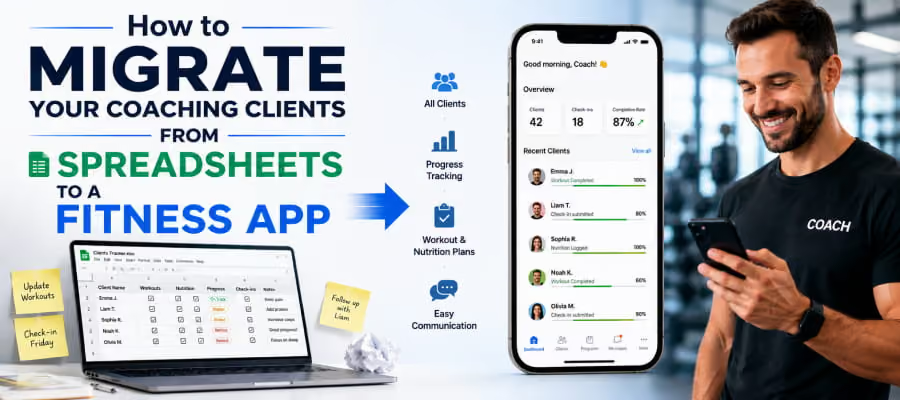

Your spreadsheet was fine at 8 clients. Now you have 25, a waitlist, and a system that's cracking at the seams.
Every Sunday, you're copy-pasting workout PDFs, chasing payment confirmations, answering the same WhatsApp questions you answered last week. Your clients are getting results, but the backend is chaos.
That's the real cost of managing clients from spreadsheets: not just time, but the professional image you're slowly losing. When a client asks, "Can I see my progress from last month?" and you're digging through three tabs to find it, they notice.
Migrating clients from spreadsheets to a coaching app isn't a tech project. It's a business upgrade. And this guide walks you through exactly how to do it step by step, without losing data, without confusing your clients, and without a single sleepless night.
Why Spreadsheets Eventually Break Every Coaching Business
![Split-screen of a messy spreadsheet tab vs. a clean coach dashboard on a laptop]](https://cdn.prod.website-files.com/61713dc07218ee71af5413af/6a3383a87ae38ed16f5c4fc4_Why%20Spreadsheets%20Eventually%20Break%20Every%20Coaching%20Business.avif)
You didn't get into fitness to manage cells and tabs. But if you're still running your client base on Google Sheets, you already know what's coming.
The Hidden Costs of Spreadsheet Coaching
Here's what your spreadsheet is actually costing you:
- Time per client per week
Manually updating a workout plan, logging a check-in response, sending a payment reminder, re-sending a PDF that a client "couldn't open." For 20 clients, this adds up to 8-12 hours of admin per week, hours you're not billing.
- Client experience gaps
Clients want to see their own progress without having to ask you. When they can't track their own journey, they feel less invested. Less invested clients quit sooner.
- Error risk at scale
One wrong cell, one misfiled check-in, one payment that falls through the cracks. At 10 clients, you catch it. At 30, you don't.
- No professional presence
Sending a PDF via WhatsApp looks fine at first. But when your client sees another trainer with their own branded app, their name, their colors, their logo, the comparison stings.
The real issue isn't the spreadsheet itself. It’s that a spreadsheet was never built to be a client management app for personal trainers. It was built for data, not for coaching, relationships, or scale.
What does Migrating to a Coaching App Actually Mean?
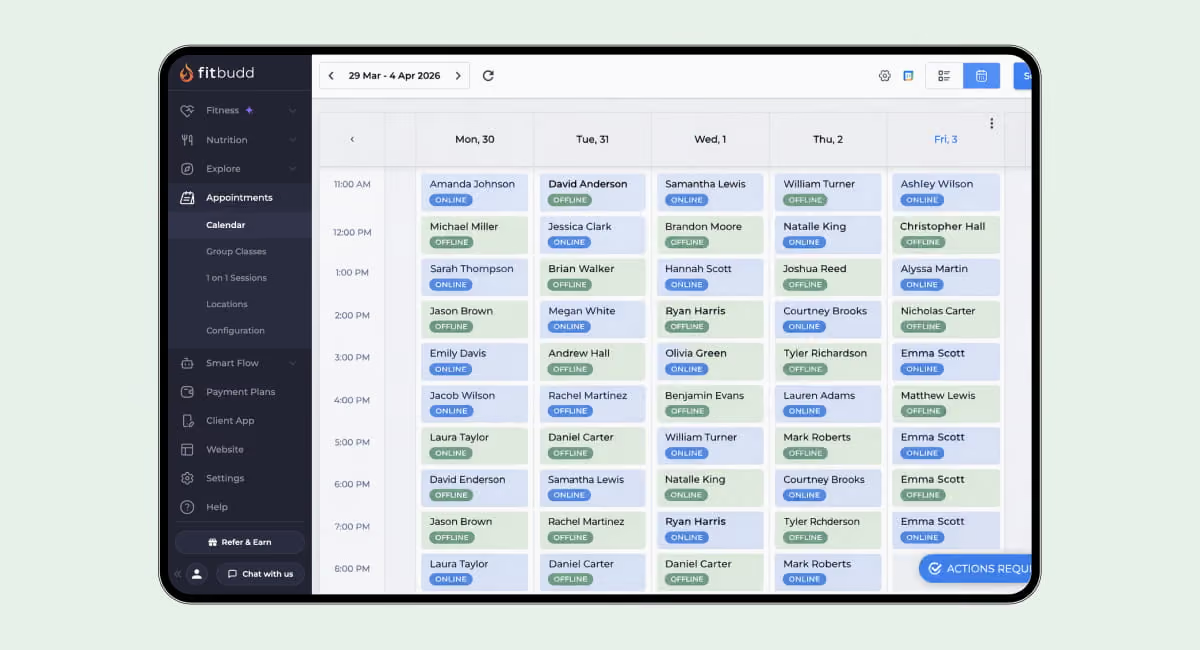
A lot of coaches overthink this step. They picture a complicated IT process with data exports, imports, tech support calls, and a week of chaos.
It doesn't have to be that way.
Migrating to a coaching app means moving your client data, programs, and communication from disparate tools into a single platform where everything lives in one place. For most coaches, this involves:
- Client profiles (name, goals, health notes, start date)
- Current programs (weekly workout plans, progressions)
- Payment records and billing cycles
- Check-in history and progress photos
- Communication threads
The goal isn't to recreate your spreadsheet inside a new tool. The goal is to replace the entire spreadsheet system with something built for how coaches actually work.
Some platforms are built specifically for this transition. The team handles the technical side of data migration, so you don't have to do it alone.
See how FitBudd's onboarding support works
Migrating to a Coaching App in 5 Easy Steps
Step 1: Audit Your Current Spreadsheet System
Before you move anything, you need to know what you're moving.
Open your spreadsheet and categorize every piece of data:
- Client information: Name, contact details, health history, goals, start date, and any injury or limitation notes.
- Program data: Current training plan, week number, recent progressions, any notes on exercise modifications.
- Financial records: Package type, billing date, amount, payment method, renewal date.
- Progress history: Measurements, photos, performance benchmarks, weekly check-in responses.
- Communication logs: Anything critical that's been shared via WhatsApp, email, or DMs that you'd need to reference.
This audit does two things. First, it shows you what data is clean and ready to move. Second, it exposes gaps in clients' records that are patchy or incomplete. Fix those gaps now, before migration, not after.
A quick tip: create a simple master client list with status flags. "Ready to migrate" vs. "Needs cleanup." This speeds up the next steps.
Step 2: Choose the Right Coaching App Before You Commit
Not all online coaching platforms are built the same. Picking the wrong one costs you twice, once to migrate in and once to migrate out.
Here's what actually matters when you're choosing where to move your clients:
Does It Have a Branded Client-Facing App?
Your clients need to feel like they're using your app, not a generic platform with someone else's logo. White-label fitness apps put your name, colors, and brand on the experience your clients see.
This matters more than most coaches realize. A branded app increases perceived professionalism, improves retention, and stops clients from associating their fitness journey with a third-party software company.
A white-label fitness app gives you a fully branded experience on iOS and Android. Clients download your app. They see your brand. You own the relationship.
Does It Cover All Your Core Workflows?
The point of migrating is to stop using multiple tools. Make sure the platform handles:
- Workout delivery and tracking
- Progress photos and measurements
- In-app messaging
- Payment collection
- Check-in automation
- Nutrition tracking (if relevant to your coaching model)
FitBudd covers all of this, including automation tools that handle check-in reminders, onboarding sequences, and renewal prompts, so you don't have to touch anything.
Is It Scalable?
The right platform today should still work when you've doubled your client base. Check:
- Per-client pricing structure (does it punish growth?)
- Team/trainer logins, if you ever hire
- Analytics and reporting as your business grows
FitBudd's starts at $15/month for new coaches and scales with your roster, with no hidden per-client penalties at small sizes.
Review the full pricing detailshere
Does It Support Yoga, Studio, or Gym Models?
If you run a yoga, fitness, or small gym studio, you need features such as class scheduling, group management, and QR code check-ins, along with individual client tools. A coaching app must serve yoga studios and gym studios with specialized feature sets, not just solo trainers.
Curious what a branded app looks like for your coaching style? Watch this walkthrough on the FitBudd YouTube channel to see how coaches add clients and get set up fast.
Step 3: Set Up Your Platform Before Inviting a Single Client
![rainer setting up their branded coaching app dashboard on a desktop computer]](https://cdn.prod.website-files.com/61713dc07218ee71af5413af/6a33884d792584d66eee976f_Step%203_%20Set%20Up%20Your%20Platform%20Before%20Inviting%20a%20Single%20Client.avif)
This is the step most coaches skip and then regret.
Before your first client receives an invite, your platform should be fully built. That means:
- Brand setup complete
Your logo uploaded, color scheme applied, app name set. On FitBudd's Super Pro plan, your app is live on the App Store and Google Play under your brand name. On the Pro plan, clients access a branded experience through the FitBudd client app.
- Onboarding questionnaire live
FitBudd lets you build a custom intake form that fires automatically when a new client accepts their invite. Use this to capture goals, health history, injuries, and preferences all in one place, with no follow-up messages needed.
- Program templates built
Before migrating clients, recreate your core programs inside the platform. Most coaches have 3-5 template structures that they customize for each client. Build those first. Migration becomes much faster when you assign templates rather than building from scratch for each person.
- Payment plans configured
Set up your subscription tiers, one-time package options, and trial periods. FitBudd connects with Stripe and PayPal, so payments are collected automatically. No more manual invoice chasing.
- Test with yourself first
Create a test client profile using your own email address. Go through the full client experience: accept the invite, receive a program, log a workout, and send a check-in. Fix any friction points before your real clients see it.
Step 4: Migrate in Phases Start with 5 Clients, Not 50
![Numbered checklist graphic showing a phased client migration process]](https://cdn.prod.website-files.com/61713dc07218ee71af5413af/6a3388defab558fa865b1382_Step%204_%20Migrate%20in%20Phases%20Start%20with%205%20Clients%2C%20Not%2050.avif)
The biggest mistake coaches make when switching platforms: they try to move everyone at once.
That approach creates a flood of confused messages, a support nightmare, and at least one client who churns because the transition felt chaotic. Instead, phase your migration.
Phase 1: The Trusted 5 (Week 1)
Pick 5 clients who are tech-comfortable, engaged, and likely to give you honest feedback. These are your beta testers.
Send them a personal message explaining the upgrade. Something direct and warm:
"Hey [Name], I'm moving us over to my new coaching app, which means you'll have a proper place to track your progress, see your programs, and message me without getting lost in a thread. I'm starting with a few clients this week and wanted you to be first."
Onboard them, gather feedback for 3-5 days, and fix any setup issues before the next wave.
Phase 2: The Next 10-15 (Week 2)
Once Phase 1 runs smoothly, send invites to your next group. By now, you have confidence in the setup and can answer questions more quickly.
Phase 3: Remaining Clients + New Joiners (Week 3+)
Complete the migration. From this point, all new clients are onboarded directly through the app, no spreadsheet ever again.
This phased approach means your personal trainer software is tested under real conditions before full rollout. It also means you're never overwhelmed.
Step 5: Communicate the Upgrade Frame It as a Benefit, Not a Disruption
![rainer sending a friendly client update message on a phone]](https://cdn.prod.website-files.com/61713dc07218ee71af5413af/6a33891a0345e6b4330f16aa_Step%205_%20Communicate%20the%20Upgrade%20Frame%20It%20as%20a%20Benefit%2C%20Not%20a%20Disruption.avif)
Your clients don't care about your tech stack. They care about their results and their experience.
When you announce the migration, lead with what changes it will bring for them, not what's easier for you.
What to tell them?
- "You'll have your own app where you can see your workouts, log sessions, and track your progress photos over time."
- "Check-ins happen inside the app now, no more sending photos via WhatsApp."
- "I can see your progress in real time and adjust your plan faster."
- "Payments are automatic, no more reminder messages."
What to avoid saying?
- "I'm switching to new software."
- "This is easier for me to manage."
- "The old system was getting messy."
The framing is simple: this upgrade is about their experience, not your convenience. Even if the main benefit really is your sanity.
For clients who are hesitant about new tech, offer a 5-minute walkthrough call. A client app is designed to be intuitive, so most clients can navigate it independently during the first session. But the offer of support removes the friction of resistance.
Need a step-by-step client onboarding checklist to send to new and migrating clients? FitBudd's Academy has ready-to-use templates.
What Happens to Your Data? Addressing the #1 Migration Fear
![Shield icon over client data records illustrating secure data transition]](https://cdn.prod.website-files.com/61713dc07218ee71af5413af/6a338963ce1075f07c1f8ee8_What%20Happens%20to%20Your%20Data_%20Addressing%20the%20%231%20Migration%20Fear.avif)
The fear most coaches don't say out loud: "What if I lose everything?"
It's a fair concern. Years of progress data, check-in photos, and program history should disappear with the switch. Here's how to protect it:
Export before you migrate.
Before touching anything in your new platform, download your spreadsheets as local backups. PDFs, CSVs, and photos saved to a folder. Keep these for 90 days minimum.
Re-enter critical historical data manually.
For active clients, it's worth entering their key stats: starting weight, current measurements, and recent performance benchmarks. This gives both of you a baseline inside the new platform.
Progress photos:
Transfer these to each client's profile in the app. The app should let you upload historical photos directly into client profiles, so their full journey is visible, not just what happened after migration.
For a deeper look at the white-label setup process, the white-label fitness app customization guide walks through every configuration step.
How FitBudd Makes the Switch Easier Than Any Competitor
Other platforms talk about migration. FitBudd is built for it.
Here's what separates the experience:
Guided onboarding from day one
From the moment you sign up, FitBudd's onboarding team walks you through setup, branding, and client import, with real support via email, chat, and Zoom calls (Pro plan and above).
No coding. No developers
Your branded app launches on iOS and Android with no technical knowledge required. You configure it inside your dashboard. The white-label apps guide covers exactly how the branding process works.
One dashboard for everything
Client programs, progress tracking, payments, messaging, check-ins, nutrition, and analytics all in one place. Your spreadsheet had six tabs. FitBudd has one dashboard.
Scales without punishing you
FitBudd's Pro plan starts at $79/month for up to 20 clients, with each additional client at $2/month. The Super Pro plan at $149/month adds a fully white-labeled iOS and Android app. For studios and gyms managing 100+ clients, the Elite plan includes dedicated account management, advanced analytics, and multi-location access.
Built for all fitness business types
Whether you're a solo personal trainer, running a gym studio, or managing a team, FitBudd's gym CRM software and multi-trainer tools scale with your model.
Hundreds of verified coaches rate FitBudd 4.6+ on review sites like Capterra and G2. Most of the awards go to full 5 stars for automation, branding, and client retention features.
Common Mistakes to Avoid When Migrating Clients
Even a smooth migration can hit bumps if you miss these:
- Migrating before your platform is fully set up
Clients who receive an invite to a half-built app lose confidence in the switch before it even starts.
- Using generic messaging
Sending a "we're switching tools" email without client-benefit framing leads to pushback. Lead with what's in it for them.
- Not testing the client experience yourself
Always go through the full client journey from invite acceptance to first workout log before inviting real clients.
- Forgetting to cancel old subscriptions
After migration is complete, audit all your existing tools: spreadsheet integrations, payment tools, PDF builders, and scheduling apps. Cut what you no longer need.
- Ignoring clients who don't engage
After each migration phase, check which clients haven't opened their invite. A personal follow-up message moves nearly all of them. Don't assume silence means rejection.
Real Impact: What Coaches Experience After Migrating
The shift coaches most often describe after leaving spreadsheets isn't time saved; it's the feeling of being a real business.
That's not just about having better software. It's about the compounding effect of a professional system: clients who log more consistently, trainers who adjust programs faster, and a business that communicates confidence at every touchpoint.
The spreadsheet had one job. Storing data. A client management app for personal trainers handles the entire process: delivery, tracking, communication, payment, and retention.
Ready to migrate your clients and launch your own branded app? Start your free trial with FitBudd, no credit card required on the Starter plan, and the setup team is with you from day one.












.jpg)
.jpg)