

Personal trainers who aren’t using AI are working harder than they need to. That’s the honest reality of 2026.
AI won’t replace you. But right now, it gives trainers an edge by saving 5 to 10 hours a week on non-billable tasks, scaling client rosters without burning out, and producing marketing content that would have taken a full afternoon in 20 minutes.
This guide covers everything: the use cases that actually move the needle, a side-by-side tool comparison (including free options), 15 copy-paste ChatGPT prompt templates, and a clear path to getting started even if you’ve never touched an AI tool before.
Personal trainers use AI for workout programming, meal planning, client communication, marketing content, business analytics, and form analysis.
The best approach for any AI fitness trainer is an AI-equipped coaching platform combined with a general-purpose assistant like ChatGPT or Claude. AI, or artificial intelligence, handles the first draft; the trainer provides the judgment, personalization, and human connection that clients actually pay for.
How Personal Trainers Are Using AI in 2026
The question of whether to use AI is over. The question now is which tasks to hand off and how.
The macro numbers confirm it. ISSA's 2025 "Human Advantage" report — surveying certified and aspiring fitness professionals found that "this mix reflects a profession that is neither blindly embracing nor uniformly rejecting AI. Instead, trainers are testing tools pragmatically, with a clear eye toward time, efficiency and client value." Meanwhile, the global AI personal trainer market is forecast to grow from roughly $16.9 billion in 2025 to over $35 billion by 2030 a 16% compound annual growth rate. The profession and the tools supporting it are expanding simultaneously.
According to FitBudd's 2026 AI Fitness Coaching Report, the fitness industry's first dedicated primary research study on AI adoption, stating 91% of fitness coaches now use AI, with 71% doing so regularly and 59% using it daily. Of that 91%, three-quarters adopted AI tools only in the past two years, indicating the adoption curve in this profession is among the fastest on record.
And yet, 77% of those same coaches believe AI can never replace a human coach. That's not a contradiction. That's clarity, and it's your opportunity.
The trainers winning right now aren't those with the most clients or the best equipment. They're the ones who figured out which parts of coaching require a human, and delegated everything else to AI.
The top AI use cases among trainers in 2026:
- Content creation: 73% use AI here, making it the #1 application by a wide margin
- Research and learning: 73% use AI to stay current on methodologies, new tools, and industry data
- Workout programming: 52% use AI to generate first-draft programs
- Nutrition planning: 52% and growing, with regulatory caution around scope-of-practice keeping some back
- Admin and communication: automating onboarding, check-ins, and re-engagement nudges
The top concerns trainers have about AI:
Those concerns are worth contextualizing with consumer data. ABC Fitness's Summer 2025 Wellness Watch Report drawing on proprietary data from 40 million members and 650,000 fitness coaches found that 49% of consumers now use an AI-based fitness or wellness app daily. Yet 55% worry about data and privacy, and 35% cite lack of personalization as a barrier to trust. Robert Jackson, VP of AI at ABC Fitness, summarized the opportunity clearly: "The future belongs to those who use AI not just as a tool, but as a core part of how they operate and grow." Your clients are already using AI. The question is whether your coaching infrastructure is the one they trust most.
- Accuracy and safety: 54% worry about AI generating inaccurate or unsafe advice
- Keeping up with the pace of change: 40% feel overwhelmed by how fast AI is moving
- Client perception: coaches use AI privately but remain unsure how clients would react
We'll address all three directly in this guide, including a full section on how to talk to your clients about it.
7 AI Use Cases for Personal Trainers
1. Workout Programming and Program Building
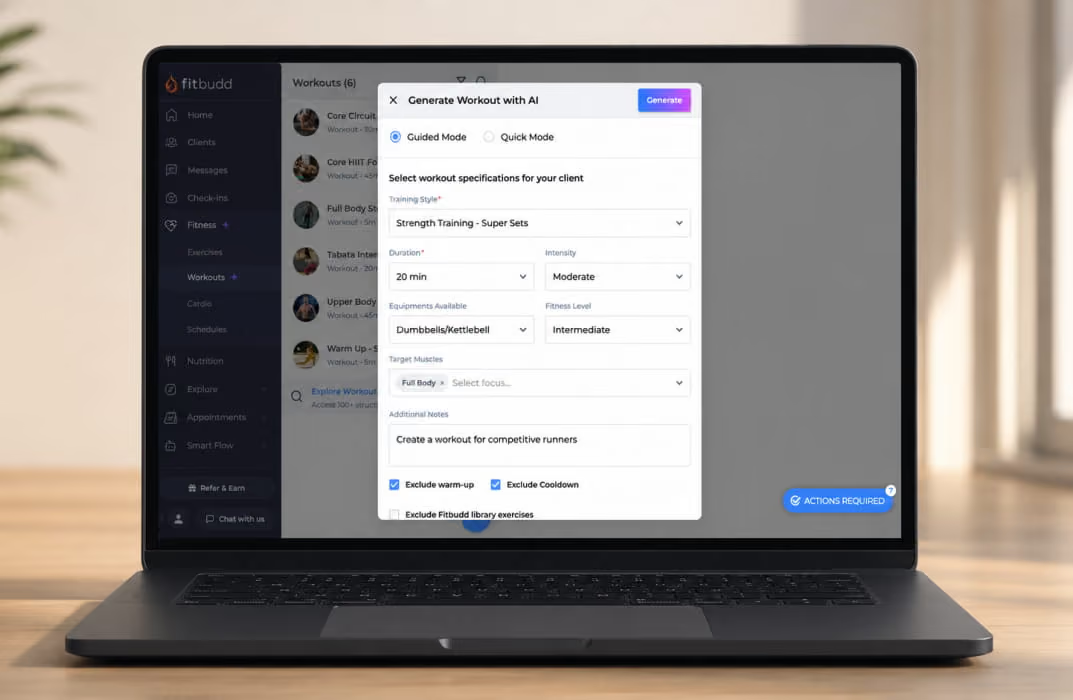
This is where AI saves the most time for the most trainers. A program that used to take 45-60 minutes to build from scratch now takes 5-10 minutes.
The key is that AI is writing the first draft, not the final program. You enter the client's goals, training history, access to equipment, and any injuries or limitations. AI generates a structured weekly plan. You review it, tweak what doesn't fit, and assign it.
The better your input, the better the output. That's where most trainers go wrong, and they give a vague prompt and get a vague program.
FitBudd's AI workout builder pulls directly from each client's profile data, including goals, intensity, and equipment, so the output is already personalized rather than generic. Trainers using it report cutting programming time by more than half.
What AI handles well:
- Generating structured periodization blocks
- Adjusting sets, reps, and rest for different fitness levels
- Creating exercise variations based on equipment constraints
- Building warm-up and cooldown sequences
What you still own:
- Reading whether the client is under-recovered and pulling back intensity
- Spotting movement compensations that make an exercise unsafe for this specific person
- Making judgment calls on progression based on mood, life stress, and sleep quality
2. Client Communication and Automated Check-Ins
Managing consistent communication across 20 or 30 clients manually doesn’t scale, especially if you want to preserve accountability and motivation. AI changes this.
The most time-saving automations trainers set up:
- Onboarding sequences: when a new client signs up, a triggered welcome series walks them through how the app works, what to expect in week one, and how to reach you
- Weekly check-in prompts: automated at the same time every week, so you’re not manually following up one by one
- Re-engagement nudges: when a client’s workout frequency drops, or check-in responses stop, an automated sequence flags them and prompts action to keep users engaged before they cancel
- Milestone messages: celebrating PRs, bodyweight goals, or program completion milestones automatically
Draft the message once with AI. Customize it to sound like you. Let your coaching platform run it indefinitely.
3. Nutrition Planning and Meal Suggestions

AI nutrition tools in 2026 can generate a full seven-day meal plan with recipes, macros, a grocery list, and portion guidance in minutes. This used to be a billable service that took an hour per client to produce.
Two approaches trainers use:
General-purpose AI (ChatGPT, Claude): you give a prompt with the client's caloric target, macros, dietary restrictions, and preferences. It returns a formatted meal plan you can edit and send. Good if you want control over the output format.
Platform-integrated tools: With FitBudd's nutrition coaching, you can generate plans that sit alongside workout programs inside the same client-facing app. The client sees their meals, workouts, and habits in one place and not three separate apps they'll eventually stop using.
Either way, your role stays the same: AI does the math, you provide the clinical judgment. Always review AI-generated nutrition plans against a client's medical history, allergies, and scope-of-practice considerations before sending.
That review step is also a scope-of-practice safeguard. The NSCA draws a clear line between general nutrition education, which trainers can offer, and medical nutrition therapy, which is reserved for registered dietitians. It specifically advises referring any client with a nutrition-affected condition, such as diabetes, an eating disorder, or heart disease, to a qualified professional. An AI meal-plan draft doesn't know where that line sits. You do, and that is exactly why the human review is non-negotiable.
4. Marketing Content Creation
This is the most widely adopted AI use case in fitness coaching: 73% of coaches use AI for content creation, according to FitBudd's 2026 research. Coaches who value it call it their most useful application by a wide margin.
It makes sense. Most personal trainers know they should post more consistently, email their list more often, and follow up with leads faster. They just can't find the time. AI closes that gap, and it's the area where AI delivers the highest quality output relative to the effort required.
What trainers use AI to produce:
- Instagram captions (drafts ready in 30 seconds)
- Email newsletters
- Blog post outlines and first drafts
- Ad copy for Meta and Google campaigns
- Lead magnet content (e.g., "7-day fat loss guide")
- Client education carousels
- YouTube script outlines
The workflow: give AI your brand voice, your niche, and what you want to say. Get a first draft back. Edit for accuracy and personality. Publish.
For trainers building their social presence from scratch, use FitBudd's free AI personal trainer bio generator to nail your Instagram and website bios; they're surprisingly overlooked pieces of first-impression content.
5. Business Analytics and Client Retention Signals
Modern coaching platforms now use AI to surface retention risks before they become cancellations.
The signals AI watches:
- Missed workouts exceeding a threshold
- Declining check-in response rates
- Drops in training frequency
- Reduced engagement with app content
When a client starts showing these patterns, the platform flags them so you can reach out proactively rather than chasing a cancellation email.
For trainers managing 25+ clients, this alone changes the retention math. Instead of realizing a client has drifted three weeks too late, you catch it at day five and send a personal message. That's the difference between keeping a client for another six months and losing them.
6. Video Analysis and Form Coaching
This is the least mature category, but it’s moving fast as ai personal training advances through computer vision and motion tracking.
Tools like Onform and CoachNow allow remote trainers to annotate movement videos frame by frame, flagging knee valgus, rounded lower back, or premature heel rise with visual markers the client can review asynchronously, and some systems can analyze posture, joint angles, and movement patterns in workout videos.
This is genuinely useful for online coaches with clients who submit form-check videos. An ai trainer can provide feedback with real time feedback, instant corrections, and form correction that are especially helpful for beginners.
It doesn’t replace a trained eye or a human trainer. AI cannot yet catch the subtle compensations that human personal trainers spot, but it structures the feedback workflow and makes asynchronous coaching more professional.
For most personal trainers in 2026: watch this category, but don’t invest heavily yet.
7. Client Onboarding and Intake Automation
This is a use case Trainerize's article doesn't cover, but it's one of the highest-ROI places to use AI.
New client onboarding involves repetitive tasks: sending welcome emails, collecting intake forms, explaining how the app works, setting up the initial program, and scheduling the first check-in call. Done manually, this takes 45-90 minutes per new client.
With AI and automation:
- Intake form responses feed directly into a client profile
- AI generates a summary of the client's goals, limitations, and baseline fitness from their answers
- Welcome sequence triggers automatically with personalized content
- The initial workout program draft is generated based on the intake data
You spend 15 minutes reviewing and approving. The client experience feels premium and personal, even though 80% of it ran without you touching it.
Free vs. Paid AI Tools: Full Comparison Table
One thing almost no competitor covers: an honest breakdown of what's free versus what costs money and what the real tradeoff is.
Bottom line for most trainers: ChatGPT free tier + FitBudd's built-in AI covers 80% of the use cases. Add a video editor like CapCut if you're creating social content. That's your minimum viable AI stack.
Best AI Tools for Personal Trainers in 2026

Coaching Platforms with Built-In AI
The biggest change in 2024-2026 is that AI has moved from being alongside coaching platforms to being integrated into them.
A standalone ChatGPT session knows nothing about your clients. A platform-integrated AI pulls from actual client data, including previous workouts, goals, progress history, and biometrics, to generate outputs that are already personalized. Choosing the right workout builder software for PTs now means evaluating how deeply AI is embedded in the platform, not just whether it exists as a bolt-on feature.
FitBudd: personal training app with an AI workout builder, nutrition tools, habit tracking, client messaging, payments, and branded iOS/Android apps under your name. The AI generates programs informed by client data rather than blank-slate prompts. Best for trainers who want everything, including programming, nutrition, communication, and business management in one place.
Trainerize: Strong platform, part of the ABC Fitness family. Good AI workout generation and community features. If you're evaluating alternatives, see FitBudd's comparison of the best Trainerize alternative platforms for context on how the major options stack up.
Everfit: AI-assisted programming with solid group coaching features.
PT Distinction: Deep automation and custom client journey capabilities.
If you want a side-by-side feature breakdown of the major platforms, check this compare page, which covers pricing, features, and key differences in one place.
General-Purpose AI Assistants
Pick one. Learn it well. Use it for everything text-related.
- ChatGPT: the most widely used, with the largest prompt library and community. Best for content drafting, programming outlines, email sequences, and FAQ generation.
- Claude: handles nuanced, long-form content especially well. Ideal for client communication drafts, detailed program rationales, and blog content.
- Gemini: works inside Google Workspace tools. Best if your workflow is Google Docs, Sheets, and Gmail-first.
Free AI Tools Specifically for Personal Trainers
Beyond the general-purpose assistants, FitBudd has built a set of free AI tools targeted specifically at trainers:
- AI Workout Builder: generate a structured workout plan by entering client parameters
- AI Personal Trainer Bio Generator: create a polished Instagram or website bio in under 60 seconds
- AI Recipe Generator: produce macro-aligned recipe ideas for client nutrition plans
- Fat Loss Calculator: a client-facing tool that builds trust and captures leads
- Training Calendar Generator: create weekly or monthly training schedules for clients
These are free to use and require no account. If you're searching for a free AI personal trainer solution to test before committing to a platform, these tools are the fastest starting point. They're useful standalone tools that give you a live preview of what FitBudd's coaching platform can do throughout a full client workflow.
Video and Content Creation
- CapCut: best for short-form Reels and TikToks. Auto-captions, templates, and AI B-roll. Free.
- Descript: best for longer educational content and podcast-style videos. Edit video by editing text.
- Opus Clip: upload a long webinar or Q&A, get short clips automatically extracted.
15 ChatGPT Prompt Templates for Personal Trainers
These are copy-paste ready. Replace the bracketed variables with your client's details.
Programming
- "Create a 4-week strength program for a [beginner/intermediate/advanced] client who trains [3/4/5] days per week. They have access to [equipment list] and want to focus on [goal]. No [exercises to avoid due to injury]."
- "Generate a progressive overload plan for a client currently deadlifting [X kg] at [Y reps]. Their goal is to hit [Z kg] in 12 weeks. Include weekly milestones."
- "Write a 45-minute HIIT workout using bodyweight only. The client is [fitness level], wants to burn fat, and should keep heart rate elevated throughout. Include warm-up and cooldown."
- "Create an exercise substitution list for a client with [knee/shoulder/lower back] limitations. For each standard exercise, provide two safe alternatives with brief form cues."
- "Design a deload week for a client who has been in an 8-week strength block. Include reduced volume, intensity guidelines, and two active recovery sessions."
Nutrition
- "Generate a 7-day meal plan for a [male/female] client, [age], [weight], [height], targeting [X calories] and [X]g protein per day. They follow a [diet type] diet and dislike [foods]. Include breakfast, lunch, dinner, and one snack per day."
- "Create a grocery list for the meal plan above, organized by supermarket section."
- "Write three high-protein, low-prep lunch options under 500 calories that don't require reheating and can be prepared in under 15 minutes."
- "Explain the difference between maintenance calories and a deficit to a client who has never tracked food before. Use simple language, no jargon."
Client Communication
- "Write a welcome email for a new online coaching client. Include: what to expect in week one, how to use the app, when they'll receive their first program, and how to reach me with questions. Warm, professional tone."
- "Write a re-engagement message for a client who has missed three check-ins and hasn't logged a workout in two weeks. Empathetic, not guilt-tripping. Goal: get a response."
- "Create a 3-message onboarding sequence for new clients. Message 1: Welcome + app download. Message 2 (day 3): first program uploaded notification. Message 3 (day 7): first check-in prompt."
Marketing
- “Write five Instagram caption options for a post about [topic]. My audience is [target client type]. My tone is [describe voice]. Include a call to action and 5 relevant hashtags for each."
- “Write a Facebook ad for my online coaching program. Target audience: [women 30-45 who want to lose weight without giving up their lifestyle]. Focus on the transformation, not the features. 150 words max."
- "Create a subject line A/B test for an email promoting my [program/challenge/coaching service]. Write 5 subject lines: 2 curiosity-based, 2 benefit-focused, 1 fear of missing out."
How Much Time Does AI Actually Save?
Let's put real numbers to it.
For a trainer with 20 clients who handles their own marketing:
Conservative estimate: 8-12 hours saved per week.
That's a full workday. Redirected into revenue-generating activities, such as selling spots, serving existing clients better, and creating content that compounds.
The trainers who build a 10-client online coaching business into a 40-client business in 12 months aren't working more hours. They're working the same hours with AI handling what used to eat their evenings.
How to Disclose AI Use to Your Clients
This is the section that almost no guide covers, and it's the one that matters most for maintaining trust.
Your clients' top concern isn't that you're using AI. It's that they might be getting a bot instead of a coach. Those are different things.
The honest framing:
You wouldn't apologize for using a spreadsheet to track client progress or an app to manage scheduling. AI is the same category as a productivity tool that makes you more efficient. The coaching relationship, the program decisions, and the accountability are still 100% yours.
What to say to clients:
"I use AI to help me draft the initial structure of your workout program, which I then review and customize for your specific goals and limitations. Every plan you receive has been checked and edited by me before you see it. This means I can spend less time formatting and more time thinking about what actually makes your program work for you."
This framing is transparent, accurate, and positions AI use as a client benefit and not a shortcut.
What to disclose vs. not disclose:
The non-negotiable: AI outputs that touch client health and safety must be reviewed by you before delivery. Workout programs, nutrition plans, and any recommendations that could affect a client's physical well-being are your professional responsibility. AI is the starting point; you are the accountable party.
And on the competitive side: 43% of coaches in FitBudd's 2026 survey believe coaches who fail to adopt AI will fall behind competitively. The risk of being outpaced by AI-using peers is the concern that's driving adoption, and not fear of AI replacing anyone.
How to Get Started with AI: A Day-One Guide for Personal Trainers
You don't need to be technical. You need a plan.
Step 1: Open ChatGPT and build your first program draft (30 minutes)
Go to chat.openai.com. Sign up for free. Take one real client - one you know well - and use prompt template #1 from above to generate a first-draft 4-week program.
Then compare the output to what you'd have written yourself. Note what's right, what's off, and what's missing. That calibration will shape every prompt you write from now on.
You are not looking for perfection. You're looking for a useful first draft that saves you 40 minutes in your workflow.
Step 2: Set up one automated check-in
Inside your coaching platform, create a weekly check-in message template using prompt #11 or #12 from the list above. Schedule it to send automatically every Sunday at 7 pm.
That's 5 minutes × every client × every week - automated.
Step 3: Try AI nutrition planning with a real client
Use prompt #6 to generate a 7-day meal plan for a client. Show it to them. Get feedback. Adjust. The point isn't that the AI plan is perfect; it's that you went from "I'll get to nutrition planning eventually" to "I sent a client a meal plan today."
Step 4: Create one piece of marketing content
Use prompt #13 to write five Instagram caption options. Post the best one. Note the time it took versus your usual process.
Step 5: Explore platform-integrated AI
If you're using a coaching platform, check whether it has built-in AI for workout generation. If not, evaluate whether it should. The difference between using ChatGPT in a separate tab and having AI pull from your actual client data is significant.
FitBudd's AI workout builder is the fastest place to see what platform-native AI feels like in practice. Try it free before building your entire workflow around a manual prompting process.
Step 6: Build your content brain
Create a dedicated ChatGPT "project" or Claude conversation where you store your brand voice, niche, ideal client profile, and key offering details. Every marketing prompt you run goes through this context window. The outputs will stop sounding generic and start sounding like you.
4 Real Limitations of AI in Personal Training
AI tools are genuinely useful. They're also genuinely limited. Here's where the line sits.
1. AI cannot read the room
A client shows up to a session flat. Not sleeping well, a hard week at work, or a relationship that's falling apart. A great coach adjusts. Drops intensity, checks in emotionally, and adapts the session to what that person actually needs today.
AI has no access to any of that. Every workout it generates assumes the client is ready to perform. That's your irreplaceable input.
2. AI cannot build accountability
Accountability is one of the primary reasons clients pay for a coach instead of downloading an app. An AI program has no emotional weight. When a client considers skipping a session, it's the relationship with a real person, someone they don't want to disappoint, that gets them off the sofa.
This isn't just a coaching opinion. A 2025 study in BMC Sports Science, Medicine and Rehabilitation had several versions of ChatGPT build resistance-training programs, then had a panel of Certified Strength and Conditioning Specialists and sports-science PhDs score them. The programs were structurally sound, but the researchers concluded that qualified human expertise is still essential to make AI-assisted plans safe, evidence-based, and individualized. That is the review step in your workflow, put to the test
3. AI outputs require professional review
Every AI-generated workout, nutrition plan, or client message is a draft and not a deliverable. AI does not know your client's medical history unless you tell it. It doesn't know about the knee that flares up after squats, the medication that affects heart rate response, or the eating disorder history that makes aggressive calorie cuts inappropriate.
Safety and professional judgment are non-negotiable. AI does the calculation; you do the clinical thinking. Measure the impact of AI-generated recommendations to make sure the clients achieve better, safer results.
This isn't just a coaching opinion. A 2025 study in BMC Sports Science, Medicine and Rehabilitation had several versions of ChatGPT build resistance-training programs, then had a panel of Certified Strength and Conditioning Specialists and sports-science PhDs score them. The programs were structurally sound, but the researchers concluded that qualified human expertise is still essential to make AI-assisted plans safe, evidence-based, and individualized. That is the review step in your workflow, put to the test.
4. AI cannot replace trust
77% of coaches in FitBudd's 2026 AI Fitness Coaching Report agree that AI can never replace a human coach, and that was the strongest consensus in the entire survey. Coaches embrace AI as a tool while drawing a firm line around the human core of their work.
The fear that clients will feel coached by an algorithm is real, but the data is more encouraging than most trainers expect. Only 20% of coaches believe AI could actually threaten the coach-client relationship. The rest are confident that human connection remains the product clients are buying.
The trainers who handle this well, with transparency about how they use AI and an investment in the human side of coaching, will command premium pricing as AI tools become table stakes for everyone.
The Future of AI in Fitness
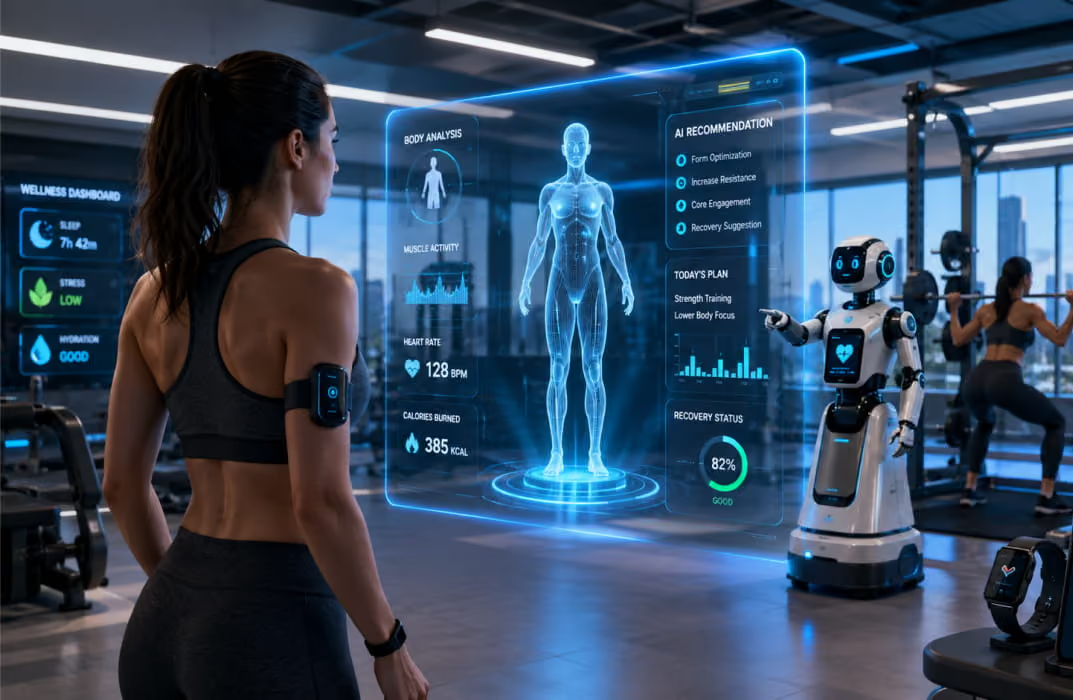
71% of coaches plan to increase their AI usage in the next 12 months. Only 3% intend to avoid it entirely. The acceleration isn’t slowing, and the gap between trainers who build AI into their workflow now versus those who wait is widening.
Three specific developments to watch in the next 12-24 months:
1. Wearable integration gets smarter: AI will move from analyzing workout logs to analyzing sleep quality, HRV trends, and recovery signals, and will adjust programming in response, with devices like Apple Watch feeding in more useful day-to-day data. The trainer who understands how to interpret this data will have a significant edge.
2. Predictive retention becomes standard: Platforms will flag at-risk clients earlier, with higher accuracy. Trainers who use data-informed retention strategies will outperform those who rely on gut feel.
3. AI video coaching matures: Form analysis from a phone camera will become reliable enough for practical use in remote coaching contexts, with better camera-based analysis in both home and gym settings. This won’t replace a coach’s eye, but it will make asynchronous coaching significantly more precise.
The through-line: AI handles more of the logistics, the data work, and the first drafts. The AI-powered fitness coach of 2026 isn’t a robot replacing a trainer; it’s a trainer who uses AI so effectively that they can serve twice the clients with the same energy. The human coach becomes more focused on judgment, relationships, and the irreplaceable things that keep clients paying month after month.
Start Coaching Smarter with FitBudd
FitBudd is built for exactly this: personal trainers who want to use AI to work more efficiently without losing what makes their coaching human.
The platform gives you:
- A workout builder for personal trainers that generates programs from real client data
- Nutrition coaching tools that sit alongside workouts in a single client app
- Automated client communication and check-in workflows
- A branded iOS and Android app under your name
- Business analytics that surface retention risks before they become cancellations
The right personal trainer AI app should handle programming, nutrition, communication, and analytics in one place, not force you to stitch together five separate tools. If you're currently managing programming in Google Sheets, check-ins via WhatsApp, and nutrition in a separate app, FitBudd consolidates all of it with AI baked into the workflow rather than stapled on the side.
Explore all FitBudd features and start 30 days free trial- NO Credit Required