
Most coaches realize they have a progress tracking problem the same way: a client drops off after eight weeks, and when you go back through the records, you can see exactly where things went wrong. The compliance dipped in week four. The check-ins got shorter. The weight stalled. All the data was there, sitting in a spreadsheet nobody was reading in time.
Client management software for personal trainers exists specifically to solve this: centralize all data points, surface them so the coach can act on them, and give clients a clear view of their own progress without waiting for a monthly review session.
But the depth of tracking varies enormously between platforms, and the wrong choice means you're paying for software that still leaves you manually chasing logs. This guide compares what's actually available in 2026 and which platforms deliver on the promise.
What "Client Progress Tracking" Actually Covers
The phrase is broad enough to mean almost anything. Before comparing platforms, it helps to break down the specific data layers that make up a complete tracking system.
Workout compliance
Did the client complete their sessions? What percentage of assigned workouts were logged? This is the first signal that indicates whether the program is working or the client is quietly disengaging.
Performance data
Weights lifted, reps completed, sets logged, personal records broken. This is the data that tells you whether to progress the program or back off load.
Body composition metrics
Weight, measurements, body fat estimates, and progress photos over time. The visual comparison between photos taken 8 weeks apart often motivates clients more than any single data point.
Biometric and recovery data
Heart rate, sleep quality, HRV, and resting heart rate trends are largely pulled from wearables. This layer tells you how the client is adapting to training load outside of sessions.
Behavioral and habit data
Check-in responses, nutrition adherence, sleep and hydration habits, and subjective wellness scores. The soft data often predicts compliance before the hard numbers reflect it.
Coach-side compliance overview

The view from the coach dashboard: which clients are on track, which are slipping, and where to direct attention without reviewing every individual profile.
The best client progress tracking apps cover all six layers. Most platforms cover the first three well. The differentiation is evident in layers four, five, and six, particularly at scale.
The Evaluation Criteria
Every platform in this comparison is assessed on five criteria, weighted toward what matters at the real coaching scale.
- Compliance visibility
How quickly can a coach see, for all clients at once, who is behind on sessions, check-ins, or habit targets?
- Data depth
How many of the six tracking layers does the platform cover natively, without requiring integrations to external apps?
- Wearable integration
Which devices sync? Does the wearable data feed the coach dashboard, or does it just appear on the client's side?
- Client-facing experience
Is the client's progress view clear and motivating enough to encourage consistent logging? Inconsistent logging produces incomplete data.
- Program-adjustment loop
How directly does the tracking data connect to modifying the client's program? The best systems allow you to review compliance trends and adjust the plan from the same screen.
The Platforms: Compared on Progress Tracking Depth
FitBudd
Best for: Coaches managing 15–100+ clients who need a unified tracking dashboard across in-person, hybrid, and online delivery
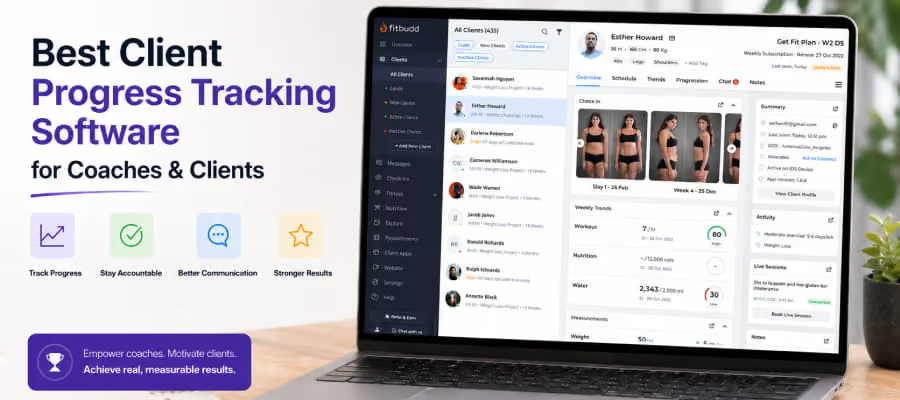
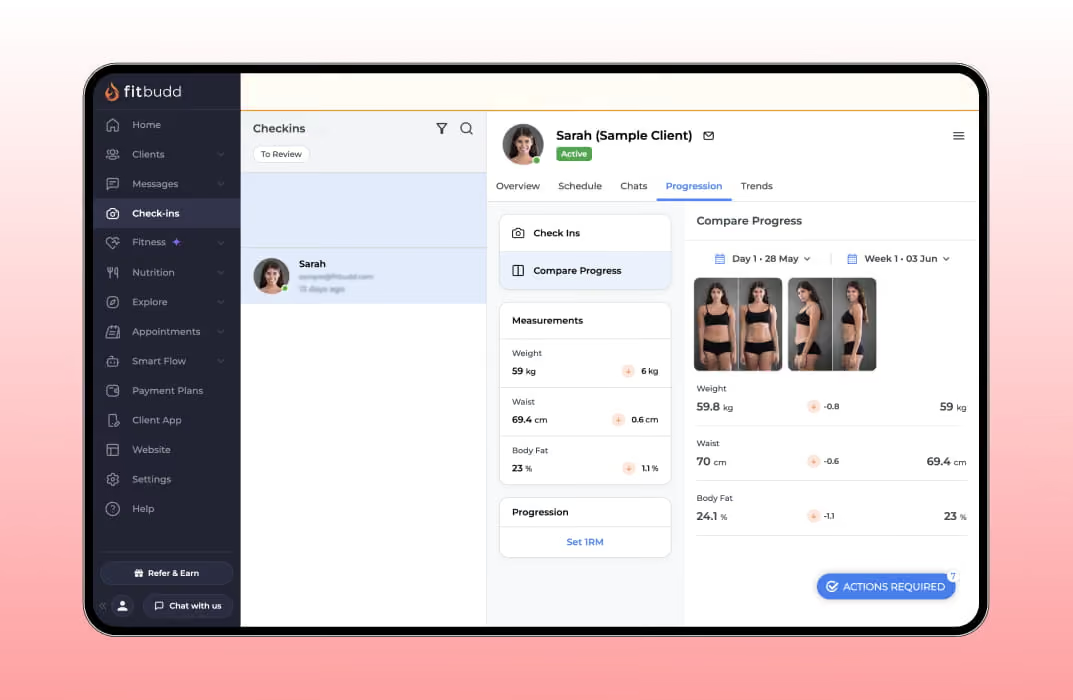
Compliance visibility: Trend analysis and compliance metrics are a core part of the coach dashboard. Coaches can see workout adherence, check-in completion, and nutrition-tracking rates at the client level and identify which clients need attention without opening individual profiles.
Data tracked natively:
- Workout logs (sets, reps, weight, video feedback)
- Body measurements, weight trends, progress photos with side-by-side comparison
- Nutrition tracking (1M+ food items, macro and calorie logging, barcode scanning)
- Daily hydration intake
- Habit tracking with custom habit creation
- Check-in responses with custom intake questions
- Biometric data from wearable integrations
Wearable integration: Apple Watch, Fitbit, and Google Fit sync natively. The data feeds into the client's profile and contributes to the overall compliance picture.
Client-facing experience: Clients log workouts, photos, measurements, and check-ins through a mobile app, either a FitBudd-branded app or the coach's white-label app. Progress is visualized with charts and graphs. The clean interface reduces friction on the client side, thereby improving data completeness for the coach.
Program-adjustment loop: Coaches access trend data and make program changes from the same dashboard. The Smart Flow automation layer handles proactive check-in reminders and follow-up messages without manual input, prompting clients to log in before data gaps open.
Honest limitations: Wearable integration covers the major consumer devices, but is not as deep as Trainerize's broader ecosystem (which includes Garmin and WHOOP). Coaches who coach elite or performance-focused athletes who rely on Garmin or WHOOP for load management may find this limiting. The on-demand content and advanced group tracking tools require the Elite Studio tier.
Pricing reference: FitBudd Pricing: Pro from $79/month, Super Pro $149/month, Elite Studio custom.
The full feature overview for tracking specifically: FitBudd Track Progress Feature Page
ABC Trainerize
Best for: Coaches who need the deepest wearable and third-party app integration available in a personal training platform
Compliance visibility: Trainerize provides weekly progress reports with compliance metrics for each client, including workout completion, habit tracking, and check-in adherence. The coach dashboard surfaces at-risk clients based on engagement patterns. Reviewers on G2 consistently rate the client dashboard as easy to use for seeing progress at a glance.
Data tracked natively:
- Workout logs with performance metrics
- Body weight, measurements, progress photos
- Habit tracking with streak and compliance visualization
- Nutrition tracking (via integration with MyFitnessPal and its own nutrition module, available as a paid add-on)
- Check-in forms with customizable questions
- Wearable biometric data
Wearable integration: The broadest in this comparison. Trainerize integrates with Garmin, Fitbit, Apple Health, Google Fit, Withings, WHOOP, and Oura. For coaches working with performance athletes who use Garmin training load data or WHOOP recovery data, this is the strongest option available in a personal training platform.
Client-facing experience: Described by reviewers as clean and motivating. PR tracking is visual and rewarding. Progress photos, habit streaks, and workout history are easy for clients to navigate. The mobile app has strong ratings across both iOS and Android.
Program-adjustment loop: Coaches review compliance data and modify programs from the same platform. The habit coaching module allows behavioral change to be tracked alongside performance data, providing a fuller picture when making programming decisions.
Honest limitations: Nutrition is a paid add-on ($45/month) rather than included in base pricing. The full wearable integration ecosystem and Storefront (for selling programs) are on mid-to-upper tiers. Pricing scales by client count, which some reviewers flag as feeling steep when crossing tier thresholds. Full white-label requires the top-tier branded app.
Pricing range: Free tier for 1 client; paid plans from $9/month up to $275/month (Studio Large). Branded app costs separately on top of plan pricing.
TrueCoach
Best for: Programming-first coaches where clean workout log data and a frictionless client experience are the top tracking priorities
Compliance visibility: Each client profile shows body metrics, workout completion data, and compliance rates. The coach dashboard provides a bird's-eye view of which clients are on track and which are falling off, without requiring individual profile review. This is the feature most frequently praised by TrueCoach users in reviews.
Data tracked natively:
- Workout logs with sets, reps, weight, and personal records
- Body metrics (weight, measurements)
- Progress photos
- Compliance rates and completion percentages
- MyFitnessPal nutrition data (visible via integration, Standard plan and above)
- Wearable sync: Apple Health, Garmin, and WHOOP (Standard plan and above)
Wearable integration: Solid for the core devices. Apple Health, Garmin, and WHOOP sync on Standard and Pro plans. Coaches see heart rate, sleep, and recovery data alongside workout logs. Less broad than Trainerize, but it covers the most commonly used performance devices.
Client-facing experience: TrueCoach's client-side app is consistently praised for its intuitive, clean design, even for clients who are not tech-savvy. Progress visualizations are clear, PR tracking is motivating, and the overall UX stays uncluttered. This is where TrueCoach has a genuine edge over platforms with busier interfaces.
Program-adjustment loop: Coaches can view compliance trends and update programming from the same platform. Video review (clients can submit form videos for coaches to comment on asynchronously) adds a qualitative layer to performance data, helping inform programming decisions that numbers alone don't fully inform.
Honest limitations: A 5% platform transaction fee on all payments processed through TrueCoach is a high cost at higher billing volumes. Nutrition tracking relies on MyFitnessPal integration rather than native tools, so food log visibility depends on the client keeping MyFitnessPal up to date. No public storefront for selling programs to new buyers.
Pricing range (annual billing): $26/month for 5 clients; $58/month for 20 clients; $137/month for 50 clients; plus a 5% platform fee on all transactions.
Everfit
Best for: Coaches who want AI-assisted programming alongside progress tracking, with modular feature add-ons
Compliance visibility: Automated reminders and compliance monitoring are available through the Autoflow feature. Coaches see workout completion rates, habit adherence, and per-client check-in data. Community features let coaches track engagement across group programs and individual clients.
Data tracked natively:
- Workout logs with performance metrics
- Body metrics and progress photos
- Food journals with macro and calorie tracking (nutrition module)
- Habit tracking with automated reminders
- Check-in forms with custom questions
- Biometric tracking
Wearable integration: Limited. Less documented and less comprehensive than Trainerize or TrueCoach for wearable device sync. Everfit's strength lies in coaching and program delivery, not in wearable data aggregation.
Client-facing experience: Reviewers note the client app is professional and polished. The AI workout builder generates programs based on client parameters, providing clients with a personalized experience even at lower-touch service tiers. Community features (leaderboards, group challenges) add a social engagement layer that can improve logging consistency.
Program-adjustment loop: The Autoflow feature is Everfit's standout here. Coaches can build automated program progressions based on timelines or compliance triggers, meaning the system itself adjusts delivery parameters without requiring the coach to manually review each client before advancing the plan.
Honest limitations: Full feature stack adds up quickly once nutrition ($33–39/month), automation ($24/month), and payments ($8/month) are included. Wearable integration is weaker than Trainerize and TrueCoach. The white-label app option is enterprise-only and priced accordingly.
Pricing at full feature stack (25 clients, annual): Approximately $128–$134/month before any processing fees.
My PT Hub
Best for: Solo trainers and small studios that need unlimited-client pricing and a broad exercise library, with adequate tracking depth
Compliance visibility: Coaches can view client exercise history, personal bests, and body metric trends. Check-in automation is available, and habit tracking lets coaches monitor behavioral compliance alongside physical performance.
Data tracked natively:
- Workout logs and exercise history
- Personal best tracking
- Body measurements and weight trends
- Habit tracking with custom habits
- Nutritional targets (basic tracking)
- Check-in responses
Wearable integration: Limited documentation on specific device partnerships. Less robust than Trainerize or TrueCoach in terms of wearable data feeding the coaching dashboard.
Client-facing experience: Reviews note that the interface can feel cluttered on the coach side. The client app experience is generally positive, though occasional navigation friction is cited by less tech-comfortable clients.
Program-adjustment loop: Manual. Coaches review client data and adjust programs; there is less automation than on platforms with more developed tools.
Honest limitations: The interface is frequently cited in reviews as outdated relative to newer platforms. The white-label app requires the Ultimate plan or a $225/month add-on for full App Store branding. Tracking depth is adequate for general fitness coaching but limited for performance-oriented clients, where load-management data is central.
Pricing: $22.50/month (Starter) to $195/month (Ultimate with branded app). Unlimited clients from the Starter tier, a genuine pricing advantage at large roster sizes.
Load Management and Wearable Data: What Coaches Working With Performance Athletes Need
The standard personal training tracking model, logging workouts, taking measurements, and reviewing photos, works well for general fitness clients. For coaches working with athletes, the tracking requirements are different.
Load management means monitoring not just what training was done, but whether the athlete's body is absorbing it. Key metrics: training load over rolling 7 and 28-day windows, acute-to-chronic workload ratio, HRV trends relative to training intensity, and sleep quality alongside session output.
When these signals diverge from baseline, such as load spikes, HRV drops, and declining sleep quality, it's an early warning that the athlete is accumulating fatigue faster than recovering from it.
For coaches at this level, the question isn't just "did the client complete the workout?" It's "is the training stimulus producing adaptation, or accumulating fatigue we can't see yet?
What the coaching platforms offer:
Trainerize has the strongest wearable data layer for this purpose: Garmin load data, WHOOP recovery scores, and Apple Health all feed into the client profile. Coaches who work with runners, cyclists, or competitive athletes can see training load trends alongside workout logs in one place.
TrueCoach covers Garmin and WHOOP on Standard and Pro plans, giving coaches visibility into recovery and load data for performance clients.
FitBudd integrates with Apple Watch, Fitbit, and Google Fit, which covers the vast majority of general fitness clients but leaves a gap for coaches whose athletes rely on Garmin or WHOOP specifically.
A practical note: None of the coaching platforms in this comparison replicates the depth of dedicated athlete performance systems like TrainingPeaks, Athletica, or Polar's Team Pro. Coaches working with elite athletes often use a coaching platform for program delivery and client management, paired with a specialized load management tool for performance analytics.
For coaches managing primarily general fitness clients, the wearable integration in mainstream coaching platforms is sufficient.
For a deeper look at what workout delivery looks like inside the coaching platform: FitBudd Workout Delivery Features
The Coach Dashboard: What "At a Glance" Actually Means at 30+ Clients

The value of a progress tracking system isn't in the individual client's data. It's in the coach dashboard that surfaces the right signal across every client in under two minutes.
At 30 clients, a coach checking in manually on each profile would spend at least 90 minutes per day on a daily review. The purpose of a well-designed compliance dashboard is to compress that to under 5 minutes by surfacing only the clients who need attention, letting the coach quickly triage their communication and programming priorities.
What a good multi-client compliance view shows:
- Clients with zero workout completions in the past 7 days
- Clients whose check-in submission has lapsed
- Clients who logged workouts but noted difficulty, injury flags, or significant fatigue
- Clients approaching a milestone (8-week mark, a personal record threshold, a program phase change)
Most platforms offer some version of this. The depth varies.
Trainerize's weekly progress reports and compliance metrics dashboard are among the most consistently praised coach-side views in this comparison. FitBudd's trend analysis and compliance overview surfaces the same information within the client management panel. TrueCoach's bird's-eye view of client activity is frequently cited in reviews as one of its core strengths for coaches managing 20+ clients remotely.
The practical test: request a demo or trial and navigate directly to the multi-client view on day one. How long does it take to identify which clients need attention? If the answer is more than 5 minutes, the dashboard isn't built for how coaches actually work at scale.
For coaches scaling to 30+ clients and evaluating whether their current setup can handle growth: FitBudd Gym CRM Software
Progress Photos: Why They Matter More Than Most Coaches Realize

Body weight is a noisy signal. Scale numbers fluctuate daily due to hydration, food intake, and hormonal variation. A client who has lost 4 pounds of fat and gained 3 pounds of muscle will show a net change of 1 pound on the scale, and may feel like nothing is working.
Progress photos, taken consistently under the same conditions, show what the scale doesn't. The visual comparison between week 1 and week 8 is often the single most motivating data point in a client's entire coaching relationship. It's also what converts into testimonials, referrals, and retention past the initial program.
The software implication: progress photo tools need to make comparison easy. The best implementations let coaches and clients pull up two photos side by side with a single tap, without needing to export images manually, open a separate photo comparison app, and reassemble the view.
FitBudd's progress photo feature includes a visual before-and-after comparison. Clients upload photos through the mobile app, and coaches can view the timeline in the client profile. Trainerize includes progress photo logging with comparison capability. TrueCoach supports photo uploads per client and stores them in the client's profile. Everfit supports photo uploads within the client tracking suite.
What to check in any platform trial: upload two photos taken 4 weeks apart and pull up the comparison view. If it requires more than 3 taps and doesn't display images side by side at a meaningful resolution, the feature isn't built for regular use, and clients will stop using it.
For a full framework on tracking client changes beyond scale weight: FitBudd Personal Trainer Assessment Blueprint
How Tracking Data Should Connect to Program Adjustments
Progress data is only useful if it changes something. The most common failure mode in coaching software is a well-built tracking system that produces data nobody acts on, because the data lives in one part of the platform and the program builder lives in another, with no clear path between them.
The ideal workflow looks like this:
- Client logs workouts for two weeks, including weight used and perceived effort.
- Coach opens the compliance view and sees that the client has been consistently hitting the top end of all prescribed rep ranges.
- Coach opens the program, increases the load on the relevant exercises, and saves the update.
- Client receives the updated program on their next login.
The entire sequence should take less than 3 minutes per client. On well-designed platforms, it does.
On platforms where tracking data and programming live in genuinely connected dashboards, including FitBudd, Trainerize, and Everfit, this workflow is the intended experience. The coaching tools are built for exactly this loop.
On platforms where they're loosely connected or require navigation across separate interfaces, the loop breaks. Coaches start pulling data manually, making notes elsewhere, and the software's efficiency gains disappear.
When evaluating any platform in a trial, deliberately test this loop. Log test data as a client, then immediately try to use that data to modify the program from the coach's side. The friction you feel in the trial reflects what you'll feel at 30 clients.
See how FitBudd's messaging tools connect check-in data to timely coach responses: FitBudd Messaging Features
For a practical overview of how online coaching delivery works end-to-end: FitBudd Online Personal Training Guide
What Clients Actually Need From a Progress Tracking App
The coach's data needs and the client's experience needs are not always the same. A platform that provides coaches with excellent compliance dashboards but presents confusing or unintuitive tracking interfaces to clients will produce incomplete data because clients won't log consistently.
From the client's side, the requirements are simpler but non-negotiable:
Fast log time
Logging a completed workout should take less than 2 minutes. If clients need to navigate multiple screens, re-enter data they've already entered, or wait for slow load times, they'll stop doing so between sessions.
Visible progress
Clients need to see that their effort is producing results. Weekly charts, streak tracking, milestone notifications, and photo comparison do this. Pure number tables don't.
One app for everything
If a client has to use the platform for workouts but a different app for check-ins, a third for messaging, and another for nutrition, they won't use any of them consistently. The value of a personal trainer app lies in consolidation, not in individual features.
No fee to the client
Most coaching platforms make the client-side app free for clients. FitBudd, Trainerize, TrueCoach, and Everfit all follow this model. Confirm this explicitly before choosing a platform, particularly if your clients are cost-sensitive.
A good workout plan app for clients is one they open voluntarily between sessions, not just because the coach assigned something. The platforms with the highest client logging rates are typically the ones with the cleanest mobile interface, the clearest progress visualization, and the most friction-free workout log flow.
You're Losing Clients Because of This One Mistake, watch this - https://youtu.be/nNXTdNBZD3U?si=KDhWU-7tBmNFu1j8
Choosing by Coaching Model and Roster Size
Not every tracking need is the same. Here's a direct mapping.
- Solo trainer, under 20 clients, general fitness focus
Compliance dashboard and body metric tracking are the priorities. Any platform in this comparison handles this well. Cost efficiency matters more than feature depth at this stage. FitBudd's Pro tier ($79/month) and Everfit's lower-tier plans both cover the fundamentals without requiring investment in features you won't use at 15 clients.
- Online coach, 20–50 clients, mixed programming goals
Multi-client compliance overview becomes critical. Automation for check-in reminders eliminates the manual follow-up that burns hours each week. FitBudd's Smart Flow automation, Trainerize's habit coaching tools, and Everfit's Autoflow all address this. Evaluate which automation model fits your coaching style.
- Performance coach, athletes using Garmin/WHOOP
Trainerize is the strongest option in this comparison. Its breadth of wearable integration means load data, recovery scores, and workout logs are all in one place. TrueCoach also supports Garmin and WHOOP on Standard/Pro at lower pricing for smaller rosters.
- Studio with in-person and online clients
You need a platform that handles both delivery modes without requiring two separate systems. FitBudd's gym studio solution handles QR code check-in, class scheduling, and online programming from a single dashboard. For studios with large rosters, the Elite Studio tier adds multi-trainer logins and admin roles.
For the broader question of how to choose the right personal trainer software for your business model: FitBudd Personal Trainer Software
Final Thoughts
Coaches who are still manually reviewing spreadsheets, chasing check-in replies by WhatsApp, and noting progress photos in a folder on their desktop are not running a tracking system. They're running a memory system, and memory doesn't scale past about 15 clients.
The right client management software for personal trainers doesn't just store data. It surfaces it at the right time, gives clients a clear picture of their own progress, and connects what you're seeing to what you change in the program next week.
Every platform in this comparison does that better than a spreadsheet. The differences are in depth, wearable integration, and how the tracking system holds up as your client list grows.
For coaches who want a single platform that covers the full tracking stack under their own brand, without enterprise pricing: FitBudd Personal Trainer Software
For coaches evaluating the AI-powered side of workout delivery alongside tracking: Best AI Workout App: What Coaches Need to Know