

Fitness club managers spend an average of 15 hours per week on administrative tasks that software should handle automatically, according to fitness industry research published in 2025.
That's nearly two full working days per week on scheduling conflicts, manual billing, disconnected check-in tools, and member communications that should be triggered automatically. For small gym owners running lean operations, that time cost is proportionally more damaging than it is for large chains with dedicated admin staff.
Gym management software exists to reclaim those hours. But the market is oversupplied with platforms built for large operations and retrofitted with small-business pricing tiers that still carry enterprise-level complexity.
This guide cuts through that. It compares the platforms small gyms are actually using in 2026, maps them to specific gym types, and gives you the real cost picture before you commit.
What Small Gyms Actually Need From Gym Management Software
Most platform comparisons list features. This one starts with problems, because the right software solves specific operational friction points rather than checking boxes on a feature grid.
Five most common pain points small gym owners report:
Manual billing and payment chasing
Members with lapsed cards, unpaid invoices, and failed recurring payments add up to missed revenue and uncomfortable conversations. The fix is automated recurring billing with built-in payment retry for failed payments.
Disconnected booking and member data
When your booking tool doesn't talk to your member database or payment system, you end up manually reconciling information across multiple platforms. Every manual step is an opportunity for error.
No visibility into who is about to leave
Members who stop showing up typically give 3–6 weeks' notice in their attendance data before they cancel. Without attendance tracking and engagement alerts, that warning goes unseen.
New member admin overhead
Every new member who needs a paper waiver, a manual welcome email, and a separate billing profile adds 15–20 minutes of setup time. Digital intake, automated onboarding sequences, and instant account creation eliminate this.
Scattered client communication
SMS, email, Instagram DMs, and WhatsApp messages from members create a fragmented communication record, making follow-up unreliable. A gym CRM centralizes this.
These five problems have a single solution set: automated billing, integrated member profiles, attendance-based retention alerts, digital onboarding, and a centralized communication layer. The platforms in this comparison differ in how completely they cover each.

The Real Cost of Gym Management Software: What You're Actually Paying
The subscription price is the number everyone compares. It's also the least predictive of what you'll actually spend.
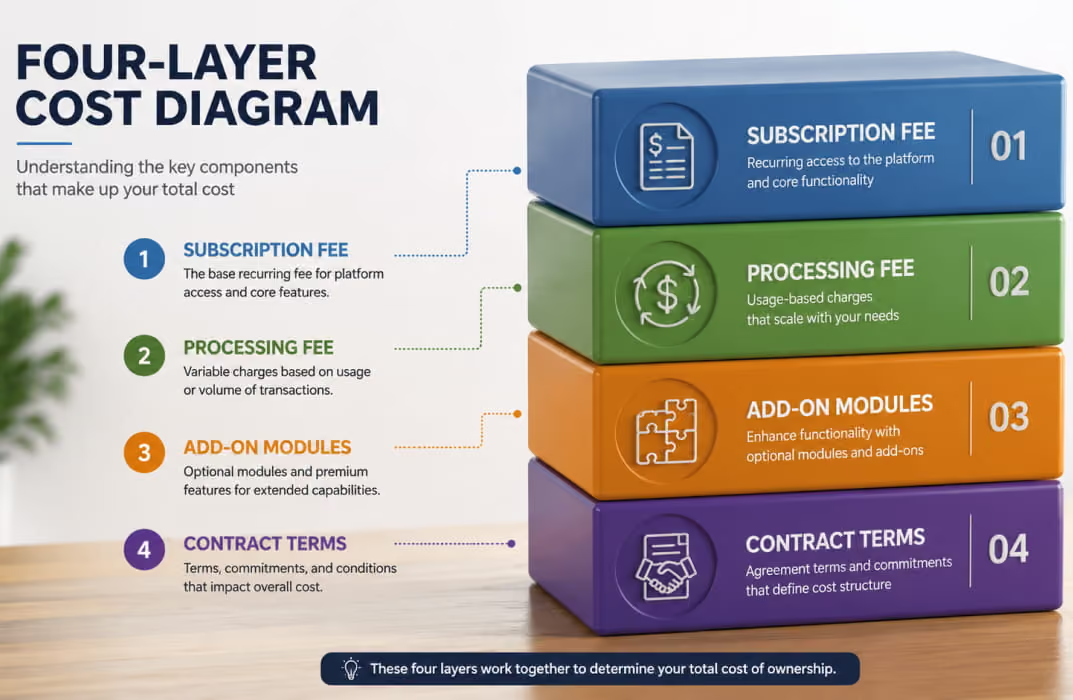
Gym management software has four cost layers. Every platform stacks them differently.
Layer 1: Subscription fee
The monthly rate is listed on the pricing page. This ranges from $0 (PushPress Free) to $700/month (Mindbody Ultimate Plus), depending on platform and tier.
Layer 2: Payment processing fees
Every platform collects a percentage of each transaction your members pay. The difference between 2.9% and 4.99% is not trivial. A gym processing $15,000/month in membership revenue pays roughly $480/month at 2.9% and $794/month at 4.99%. That's $3,768/year in extra costs at the same revenue volume.
Layer 3: Add-on modules
Branded apps, marketing automation, website builders, and CRM tools are often separate line items. PushPress's full stack can reach $559/month or more when all modules are added. Zen Planner stacks add-ons for its website, engagement tools, branded app, and EMV devices on top of the base plan.
Layer 4: Contract terms and exit costs
Annual contracts with early termination fees of 3–6 months of remaining payments are standard at Mindbody, Glofox, and Zen Planner. Month-to-month flexibility is available at PushPress, TeamUp, and FitBudd.
Before committing to any platform, calculate your expected monthly cost at your current member count and billing volume, with all the features you actually need included. The platform that looks cheapest at sign-up frequently isn't. A transparent breakdown of what gym software actually costs at different revenue volumes.
The Platforms: Compared for Small Gyms and Studios
FitBudd
Best for: PT-forward boutique gyms, hybrid studios, and independent trainers scaling to 20–100+ members who need coaching delivery alongside business management
What it covers: FitBudd operates as an all-in-one fitness business software platform: member management, automated billing, class scheduling, workout delivery, nutrition planning, progress tracking, CRM with engagement analytics, and a white-label branded iOS and Android app. All under the coach's or studio's brand name in the App Store.
Gym CRM depth: Member profiles track attendance, billing status, engagement history, fitness goals, and progress. Automated check-in reminders and the Smart Flow automation layer handle at-risk member alerts and win-back sequences without requiring manual review of every profile.
Billing model: Zero platform commission. Payments are processed through Stripe or PayPal at standard card network rates. No additional percentage taken above what Stripe charges directly.
What separates it from small gyms: Most gym management platforms are built for operations management, with coaching features added as an afterthought. FitBudd is built for coaching delivery and adds operations management. That difference is meaningful for studios where the trainer-client relationship is the core product. Members log workouts, track progress, and receive programming through the same app they use to book classes and make payments.
Honest limitations: FitBudd's strength in personal training delivery and branded app infrastructure is less relevant for pure group-class gyms that have no individual coaching component. Group class features (QR check-in, multi-trainer management, class scheduling) are available at the Elite Studio tier with custom pricing. Coaches on the entry Starter plan have limited billing flexibility; the full feature set described above applies from the Pro tier upward.
Pricing: Starter $15/month, Pro $79/month, Super Pro $149/month (full white-label iOS and Android app), Elite Studio custom.
Mindbody
Best for: Multi-service studios (yoga, Pilates, wellness, spa), studios that want marketplace-driven member acquisition, and larger operations that can justify the pricing structure
What it covers: Mindbody is the most recognized name in fitness management software. Its member-facing Mindbody Marketplace, where consumers search for local fitness options, is a genuine differentiator. Scheduling, billing, staff management, marketing automation, and POS are all included, with a large integration library.
Gym CRM depth: CRM features include lead tracking, automated marketing campaigns, targeted email and SMS, and detailed reporting. The marketing automation tools are among the most developed in this comparison, across the mid and upper tiers.
Billing model: Proprietary payment processor. Rates are approximately 2.99% plus $0.30 per transaction. Processing is not optional.
What separates it from small gyms: The Mindbody Marketplace is the real differentiator. Studios that want passive new-member acquisition from people searching for local fitness classes get genuine value from it. For studios that already have strong word-of-mouth referrals and don't rely on marketplace discovery, it's a feature they're paying for but don't use.
Honest limitations: Pricing is not publicly listed; Mindbody requires a sales conversation. Field reports from users place monthly costs at $250–$360 for typical small studios, rising to $500–$700 when marketing automation and advanced reporting are added. One verified Capterra review from a Gracie Jiu-Jitsu gym reported total monthly costs of $1,595, including base fees and processing. Annual contracts are standard, with limited flexibility for exit. The platform was rated 7.5/10 for ease of use on G2 by small-business reviewers, compared to PushPress's 9.3/10.
Pricing range: Approximately $139–$699/month depending on tier and add-ons. Exact pricing requires a sales demo.
ABC Glofox
Best for: Boutique fitness studios and gym chains in the ABC Fitness ecosystem, particularly those that prioritize a polished branded member app experience
What it covers: Glofox focuses on class-based studio management: booking, membership billing, automated communications, push notifications, and a member app. It was acquired by ABC Fitness Solutions (alongside Trainerize) in 2023, giving it access to marketplace and ecosystem integration within that group.
Gym CRM depth: Automated member communications, win-back campaigns, attendance tracking, and retention reporting are part of the core platform. Less deep on the lead management and sales pipeline side compared to PushPress Grow or Mindbody at the upper tiers.
Billing model: Pricing is not publicly listed. Reports from independent gym owners place costs at $100–$600/month, depending on features and locations. Glofox has marketed "lifetime pricing lock," meaning your rate at sign-up doesn't increase, which is a meaningful contrast to Mindbody's documented annual price increases.
What separates it from small gyms: For a single-location class-based studio with a clean booking workflow and a professional member app, Glofox covers the core needs well. It's been praised for a modern interface that doesn't feel as dated as some legacy platforms.
Honest limitations: Independent reviewers note Glofox can be over-specified and over-priced for single-location studios. Reporting and automation are less developed than Mindbody or FitBudd at the upper tiers. No pricing transparency at any tier means you cannot compare actual cost without going through a sales process.
Pricing range: Not publicly listed. Approximately $100–$600+/month based on field reports.
PushPress
Best for: CrossFit boxes, functional fitness gyms, and community-focused studios that prioritize pricing transparency and a clean member experience
What it covers: PushPress is built specifically for gym operators. Class scheduling, automated billing, member management, attendance tracking, digital waivers, retail sales, and a member app are all in the Core product. PushPress Grow adds CRM and marketing automation. PushPress Train adds programming and performance tracking.
Gym CRM depth: At the Core level, CRM capabilities are basic: member profiles, attendance history, and manual follow-up tools. PushPress Grow adds automated lead follow-up, client communication sequences, and sales pipeline management, but at an additional monthly cost.
Billing model: Free plan charges 4.19% plus $0.30 per transaction. The Pro plan at $159/month includes lower processing rates. The full-stack cost (Core, App, Grow, and Train) can reach $559/month before processing fees.
What separates it from small gyms: PushPress is the most transparent platform in this comparison, with pricing that's more transparent, and the only one offering a genuinely functional free plan (not a trial). Gym owners can start on the free tier and upgrade when they're ready, without committing to a contract or paying for features they don't yet need. The G2 ease-of-use rating (9.3/10, based on 98.4% small business reviews) is the highest in this comparison.
Honest limitations: The free plan's processing rate (4.19% per transaction) makes it expensive at any meaningful billing volume. The full feature stack carries costs that approach Mindbody's pricing once Grow, Train, and the branded app are added. PushPress Grow is a separate add-on, not included in the base gym management product.
Pricing: Free (0/month, higher processing fees), Pro ($159/month), Max ($229/month). Grow, Train, and the branded app add separate monthly costs.
Gymdesk
Best for: Small gyms and martial arts studios that want straightforward member management at transparent, member-count-based pricing
What it covers: Gymdesk covers membership management, automated billing, class scheduling, attendance tracking, online sign-ups, digital waivers, and basic reporting. The interface is deliberately simple, which has both advantages (faster onboarding, lower training burden) and limitations (less configuration depth for complex workflows).
Gym CRM depth: Adequate for small gyms: member profiles, attendance history, automated billing reminders, and basic communication tools. Less developed than FitBudd, Mindbody, or PushPress for CRM pipelines, lead management, or automated retention sequences.
Billing model: Member-count-based pricing. $75/month for up to 50 members, $100/month for up to 100 members, $150/month for up to 200 members, $200/month for up to 400 members. Processing through Gymdesk Payments at approximately 2.9% plus $0.30 per transaction. One of the lowest processing rates in the comparison.
What separates it from small gyms: Straightforward pricing, low processing fees, and an interface that a non-technical gym owner can navigate without an onboarding call are genuine advantages for very small operations. The member-count pricing model is easy to predict and budget for.
Honest limitations: Fewer third-party integrations than Mindbody or PushPress. No native live streaming. Smaller community and fewer third-party tutorials. Not designed for coaching delivery or PT program management. Best suited for gyms whose business model is primarily membership-based, not session-based training.
Pricing: $75–$200/month based on member count. No hidden add-ons for core features.
Zen Planner
Best for: Martial arts schools, CrossFit affiliates, and yoga studios that need a specialist platform with strong membership management and community features
What it covers: Zen Planner combines scheduling, automated billing, membership management, retail sales, and a member app. It has a particularly strong following among martial arts schools and CrossFit boxes for its belt and rank tracking, whiteboard/workout results logging, and member challenge features.
Gym CRM depth: Solid engagement and retention tools: automated renewal reminders, attendance-based alerts, member segmentation for targeted communications, and retention reporting. Marketing automation is available via the Engage add-on.
Billing model: Base pricing requires a sales conversation to confirm current rates. Third-party reports place Zen Planner between $99 and $198/month base, with the website builder ($99/month), Engage add-on ($249/month), branded app ($39/month), and EMV device rental ($39/month) as separate line items. The full stack can reach $450–$600/month.
What separates it from small gyms: Zen Planner's specialist features for martial arts and CrossFit (rank/belt tracking, performance benchmarks, whiteboard results) make it the strongest platform for those specific gym types. For a karate school or CrossFit affiliate, these features replace multiple tools.
Honest limitations: The add-on pricing model means the headline base price significantly understates the real cost. Gym owners who need the website builder, marketing automation, and branded app pay materially more than the base tier suggests. For general boutique fitness studios that don't use the martial arts or CrossFit-specific features, the platform is over-specified.
Pricing: Approximately $99–$198/month base (contact for current rates). Add-ons required for full feature access.
Platform Quick Comparison: Small Gym Use Cases
Choosing by Gym Type: A Direct Map
Not every gym needs the same platform. Here's a direct recommendation by business model.
Personal Training Studio or Hybrid Gym
Your core product is the coach-client relationship. You need workout delivery, progress tracking, automated check-ins, and a client-facing experience that reflects your brand. Billing needs to handle session packs, monthly subscriptions, and potentially on-demand content.
Platforms that fit: FitBudd is the strongest option here. The coaching infrastructure is native, not bolted on. Gymdesk and PushPress cover the business management side but require additional tools for coaching delivery.
See how FitBudd handles PT-forward gym operations: FitBudd for Gym Studios
Yoga, Pilates, or Mindful Movement Studio
You need flexible class scheduling, clean aesthetic customization, on-demand video for members who miss sessions, flexible membership types (drop-in, class packs, monthly), and a booking flow that doesn't feel like a CrossFit app.
Platforms that fit: FitBudd at the Elite Studio tier covers this well and allows full color and aesthetic customization. ABC Glofox offers strong class scheduling and a branded app experience for boutique studios.
What to avoid: PushPress is primarily designed for functional fitness; the UX and feature emphasis don't translate well to a yoga or Pilates context.
CrossFit Box or Functional Training Gym
You need whiteboard/workout result logging, performance benchmarks, competition events, drop-in management, and a community that competes and tracks together.
Platforms that fit: PushPress was built for this context. The UX, feature emphasis, and integrations reflect it. Zen Planner also serves CrossFit affiliates well with its workout tracking and community features. FitBudd covers general strength and conditioning programming, but doesn't have CrossFit-specific whiteboard logging.
Martial Arts School or Dance Studio
You need rank/belt tracking, grading event management, per-program membership structures, attendance for multiple disciplines, and a parent-friendly check-in experience for junior students.
Platforms that fit: Zen Planner is the specialist choice here. Its rank tracking and martial arts-specific features are designed for exactly this use case. Gymdesk is a simpler, more affordable option for schools that primarily need billing and scheduling without the depth of performance tracking.
Multi-Trainer Studio Scaling Past 50 Members
You're managing multiple trainers or instructors, you need role-based staff permissions, and you want a single dashboard that shows the full operational picture rather than a separate view per trainer.
Platforms that fit: FitBudd Elite Studio, Mindbody, and ABC Glofox all handle multi-trainer operations. FitBudd's Elite tier adds admin and coach logins, multi-location access, QR check-in, dedicated account management, and Mindbody integration for studios that want to maintain marketplace visibility.
The Gym CRM Question: What "CRM" Actually Means for a Small Gym
Every platform in this comparison markets a CRM. What they mean by that varies considerably.
At its most basic, a gym CRM is a member database: names, contact details, membership status, and payment history. Every platform covers this.
At the next level, a useful gym CRM includes attendance tracking with behavioral signals: flagging members who haven't visited in 10 days, identifying members whose check-in frequency dropped after a rate change, and surfacing the cohort most likely to churn based on historical patterns.
At the most useful level for small gym owners, a fitness business software CRM connects attendance and engagement data to automated communications: a re-engagement SMS triggers when a member goes 10 days without a check-in. A renewal reminder goes out 7 days before a membership lapses. A follow-up sequence fires automatically when a trial member hasn't converted.
The platforms that cover this full CRM picture natively for small gyms are FitBudd (Smart Flow automation), Mindbody (at Accelerate tier and above), and Zen Planner with the Engage add-on.
PushPress covers it via the separate Grow module. Gymdesk and Glofox are more limited at the automated retention layer.
For a small gym owner managing 40–80 members without a dedicated admin staff, the CRM's automation level is the feature that determines how much time the software actually saves versus how much it just organizes.
What the Gym Software Market Gets Wrong About Small Gyms
The most common mistake in gym software comparisons is treating "small gym" as a size descriptor rather than an operational model descriptor. A 30-member CrossFit box has different software needs than a 30-member personal training studio, which has different needs than a 30-member yoga studio.
The second mistake is ranking platforms on feature count rather than feature fit. A platform with 40 features, 30 of which a small gym will never use, is not more valuable than one with 15 features that map precisely to how the gym actually operates.
The third mistake is evaluating software at the current membership size rather than the 12-month trajectory. A gym with 25 members today that grows to 80 in 12 months will face a disruptive platform switch if the initial choice doesn't scale.
The time cost of migrating member data, rebuilding templates, and re-onboarding clients is often more expensive than the first year of subscription fees on a more capable platform.
The practical question before choosing: what does your operation look like at double your current membership? Does the platform you're evaluating handle that without requiring a plan upgrade that changes your pricing model or locks you into features you don't need?
A Pre-Purchase Checklist for Small Gym Owners
Use these questions before signing any contract.
1. What is the total monthly cost at my current billing volume, with every feature I need included?
Get the final number, including processing fees, add-ons, and any setup costs. Not the headline subscription tier.
2. Is pricing publicly listed, or do I need a sales demo to see it?
Platforms that don't publish pricing typically negotiate harder when they think you can pay more.
3. What are the contract terms and cancellation conditions?
Month-to-month or annual? What are the exit fees if your business model changes?
4. Can I test the full client experience as a member before committing?
Create a test member account and complete the full booking, payment, and check-in flow. If the member experience is clunky, your members will find it clunky.
5. Does the platform handle my specific gym type natively, or does it require workarounds?
A yoga studio running on CrossFit software will spend time fighting the interface instead of using it.
6. What does the migration process look like?
Can I import my existing member database? Does the platform support data export if I need to switch again later?
7. Who handles support, and what are the response times?
Email-only support with 48-hour response times is acceptable when nothing is wrong. When a member can't book a class before Monday's 6 AM session, it isn't.
For studios building a white-label branded app alongside their management software setup: White Label Fitness Apps: The Full Guide
Final Thoughts
Small gyms don't fail at gym management software because they chose the wrong feature set. They fail at it because they chose a platform built for someone else's business model and spent the next 12 months working around it.
The platforms in this comparison all serve specific gym types well. None serves every gym type equally. Matching the software to how your gym actually operates, at your current size and at your 12-month target, is the decision that determines whether your software saves you 15 hours per week or costs you 15 hours per week in workarounds.
For PT-forward boutique studios and hybrid training businesses that need coaching delivery, a branded client app, and a gym CRM without enterprise pricing.
Also Read
Best Gym Member Engagement & Win-Back Apps
Best Membership Management Software for Gyms & Studios
Best White Label Gym Apps for Studio Owners
Best Client Progress Tracking Software for Coaches
8 Best Sport-Specific Training Apps & Platforms for Strongman Competitors and Coaches